Demo ad · fictional product · 16.1 seconds, silent
Audio gear · step-by-step tutorial
Team Radio Earpiece AI ad with Liu Xialan
A race engineer cuts through pit-garage noise with one tap on her earpiece. Four shots, one product still and a pack of 19 character images. Below is every step we took, in order: which pack files we uploaded, the exact messages we sent to the AI, the settings, what came back, which takes we threw away, and how we cut the ad. Download the pack and you can make the same ad.
- Character
- Liu Xialan
- Product
- PITWAVE Team Radio Earpiece (fictional)
- Length
- 4 shots + product end card, 16.1s
- Generations
- 5 images, 4 videos
What you need
- 1
Liu Xialan's character pack
Free download, no account needed. Unzip it; the folders are numbered (01_character_reference, 02_turnaround_views …).
- 2
An image model that takes several reference images
We used GPT image model, image-to-image through the KIE API. Any image model that accepts 2–4 reference images plus a text message works the same way.
- 3
Kling 3.0 image-to-video
We used Kling 3.0 image-to-video (720p, no sound) with a character element (a saved set of reference images). Other image-to-video models work too; results will differ.
- 4
A video editor
CapCut, DaVinci Resolve, Premiere or ffmpeg. You only trim, add captions, add an end card and music.
Step 1Unzip the pack and find these files
The ad uses 8 of the pack's images. Nothing else was uploaded except the product still you make in step 3. Paths are exactly as they appear in the zip.
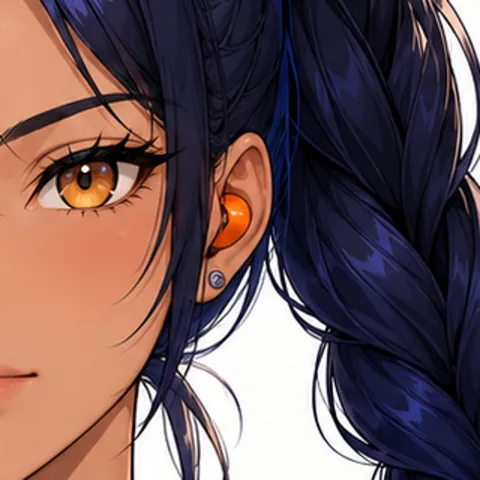 Square crop around the earpiece from 07_expressions_poses/expression_neutral.pngUsed for: Product still, Shot 2 first frame
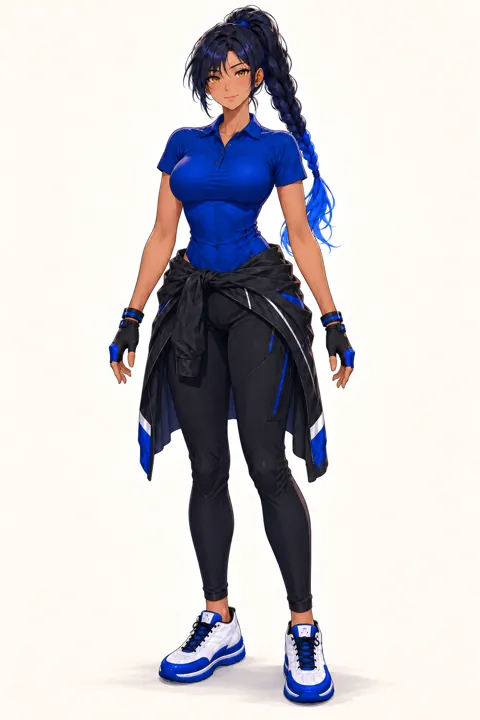 03_outfits/outfit_work.pngUsed for: Product still, Character reference (video), Shot 1 first frame, Shot 2 first frame, Shot 3 first frame, Shot 4 first frame
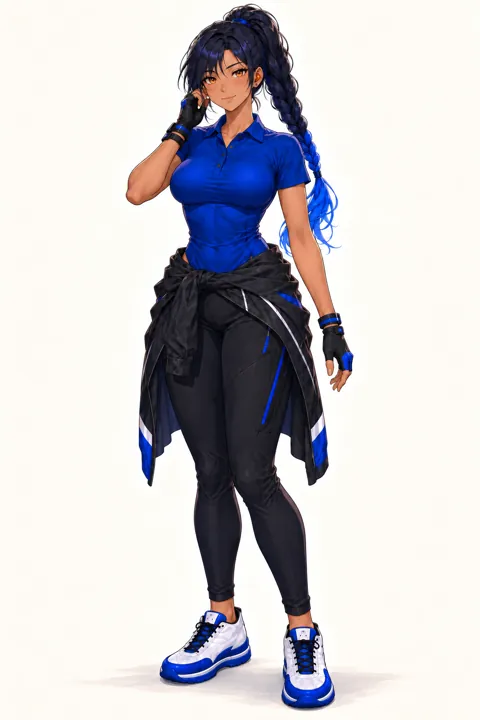 07_expressions_poses/pose_working.pngUsed for: Character reference (video), Shot 3 first frame
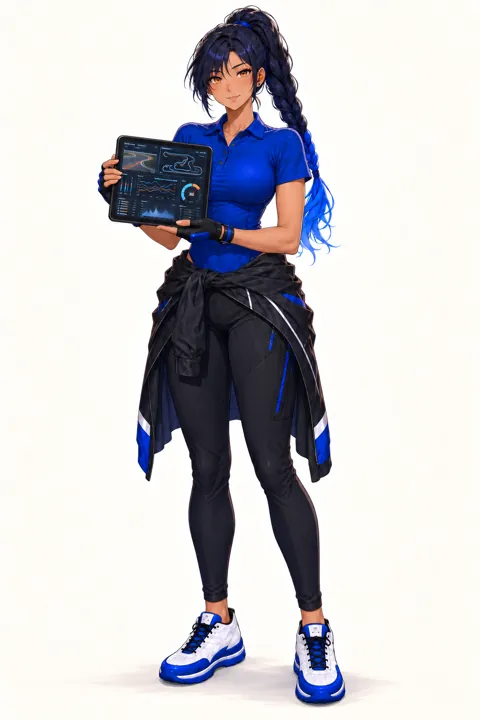 07_expressions_poses/pose_presenting.pngUsed for: Character reference (video)
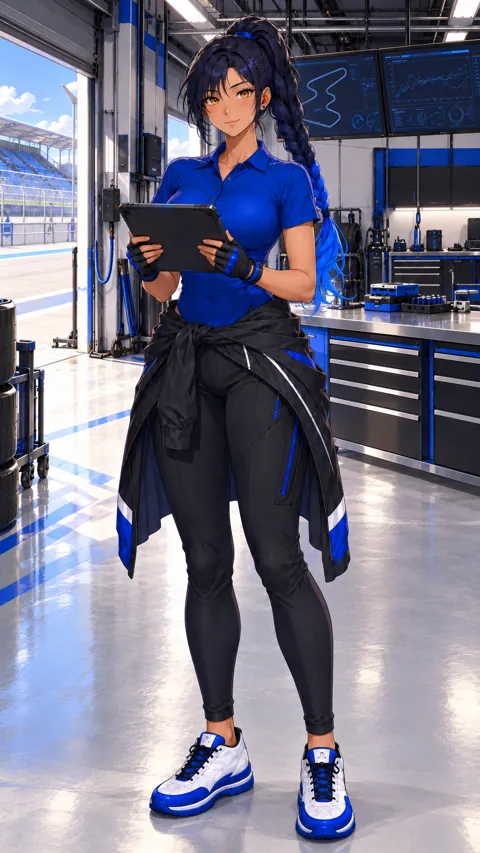 08_video_starters/video_starter_portrait.pngUsed for: Character reference (video)
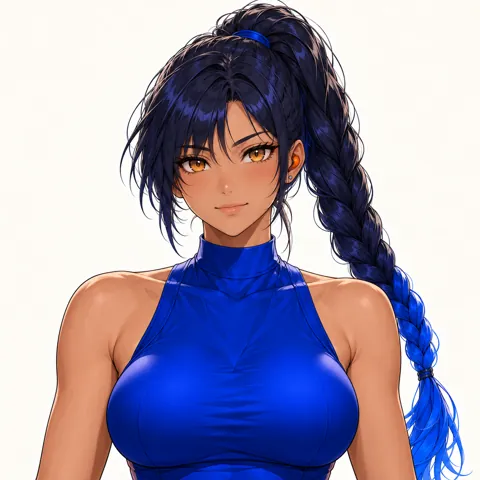 07_expressions_poses/expression_determined.pngUsed for: Shot 1 first frame, Shot 3 first frame
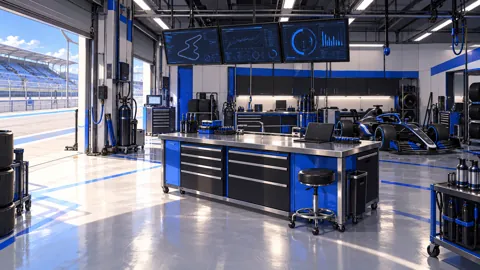 05_scenes/scene_workspace.pngUsed for: Shot 1 first frame, Shot 3 first frame, Shot 4 first frame
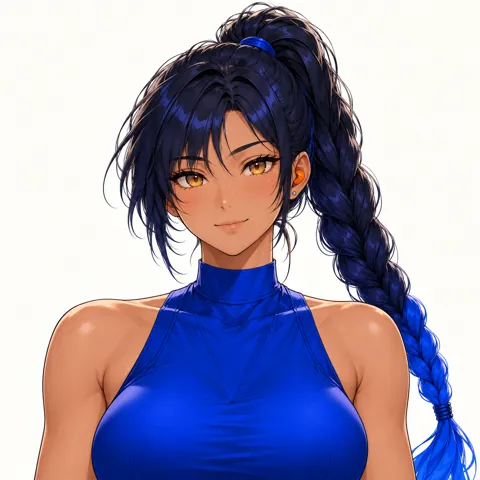 07_expressions_poses/expression_smile.pngUsed for: Shot 4 first frame
Step 2Describe the character once
Open 01_character_reference/model_sheet.png and write down what must never change: skin, eyes, hair, outfit and art style. This paragraph goes, word for word, at the start of every message in the steps below (they already include it, so you can copy them as they are). For the video model the opening words become @liu is the same …, which points at the character reference from step 4.
The English text below is the exact prompt used. Copy it unchanged to reproduce the workflow.
Same adult woman as the reference images: warm tan skin, amber eyes, deep navy hair in a high long braid with cobalt-blue tips, small orange earpiece on her left ear, cobalt-blue short-sleeve work polo, black cargo trousers, black jacket tied at the waist, blue-black fingerless gloves. Anime illustration style exactly like the references.
The English text below is the exact prompt used. Copy it unchanged to reproduce the workflow.
The woman wears the cobalt short-sleeve work polo, never a sleeveless top.
The English text below is the exact prompt used. Copy it unchanged to reproduce the workflow.
no extra people, no text or logos, no outfit change, no sleeveless top, no scene cuts, no camera cuts, correct hands with five fingers, only one earpiece
Step 3Make the product still
Make one picture of the product first. You reuse it for the end cardand as a reference in a shot, so the product looks the same everywhere. Never ask the model to write the brand name; add text in the edit.
You · Product still
1. Attach 2 images
- Expression (neutral), croppedSquare crop around the earpiece from 07_expressions_poses/expression_neutral.png
- Outfit03_outfits/outfit_work.png
2. Send this message, word for word
The English text below is the exact prompt used. Copy it unchanged to reproduce the workflow.
Anime illustration product shot in exactly the same art style as the references. One small glossy orange in-ear earpiece, the same shape and colour as the earpiece in her ear in the first reference, lying beside its open matte-black charging case that has a thin cobalt-blue accent line. Centred on a dark charcoal studio surface, soft cobalt-blue rim light, subtle reflection, generous empty space on the left for a title. 16:9 still. No people, no text, no logos.
3. Settings
- GPT image model, image-to-image
- 16:9
- 1K
AI returns
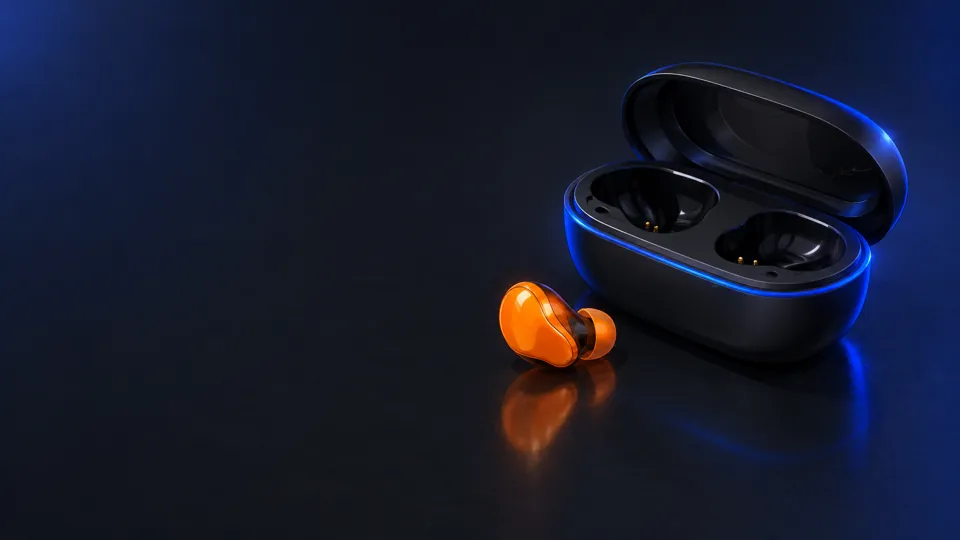
- Same art style as the pack.
- No text, logos or people in the image.
- Empty space on the left for the brand name.
Step 4Save the character reference for video
In Kling 3.0 we saved these 4 images as one character element named liu with the description below. Every video message then starts with @liu, and Kling keeps the face and outfit from these images. If your video tool has no such feature, skip this step: the first frame and the character description still carry most of the look.
- Outfit03_outfits/outfit_work.png
- Pose (working)07_expressions_poses/pose_working.png
- Pose (presenting)07_expressions_poses/pose_presenting.png
- Video starter (portrait)08_video_starters/video_starter_portrait.png
The English text below is the exact prompt used. Copy it unchanged to reproduce the workflow.
liu
The English text below is the exact prompt used. Copy it unchanged to reproduce the workflow.
adult woman race engineer, cobalt short-sleeve work polo
Step 5Shot 1: Garage noise
3s in the ad · caption: “120 dB in the pit garage”
1a · Make the first frame
You · First frame
1. Attach 3 images
- Expression (determined)07_expressions_poses/expression_determined.png
- Outfit03_outfits/outfit_work.png
- Scene05_scenes/scene_workspace.png
2. Send this message, word for word
The English text below is the exact prompt used. Copy it unchanged to reproduce the workflow.
Same adult woman as the reference images: warm tan skin, amber eyes, deep navy hair in a high long braid with cobalt-blue tips, small orange earpiece on her left ear, cobalt-blue short-sleeve work polo, black cargo trousers, black jacket tied at the waist, blue-black fingerless gloves. Anime illustration style exactly like the references. Medium shot in a racing pit garage full of noise: she stands at the telemetry workbench, wincing with eyes half shut, her gloved left hand raised beside her left ear where the small orange earpiece sits. Blurred blue monitors, tool carts, heat haze, sparks in the far background. Cool blue light. Create one 16:9 cinematic still frame for this shot. The woman wears the cobalt short-sleeve work polo, never a sleeveless top. Clean anatomy, no text, no logos.
3. Settings
- GPT image model, image-to-image
- 16:9
- 1K
AI returns
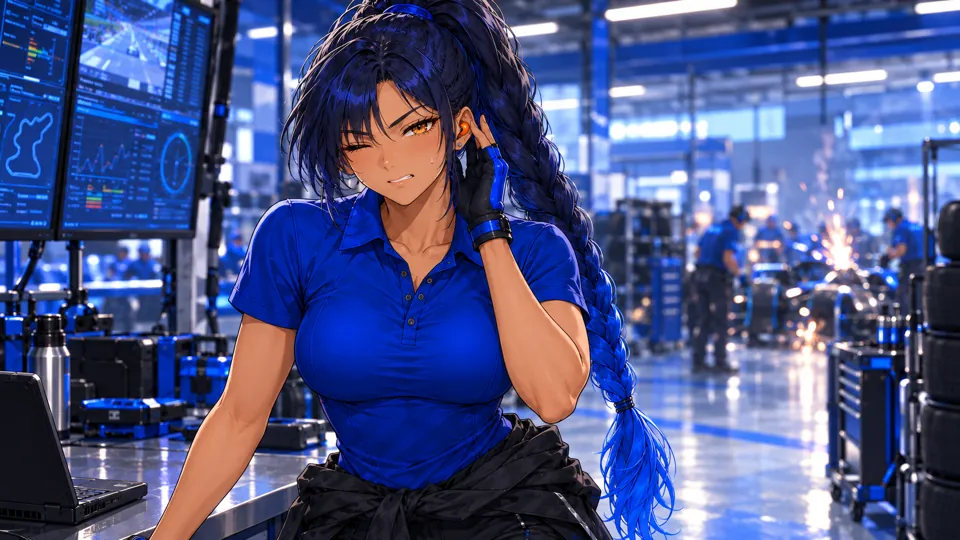
- Face, hair and outfit match the turnaround sheet.
- Hands have five fingers; no text or logos.
- If anything is off, generate again before making the video. The video can only be as good as this frame.
1b · Turn it into video
You · Video
1. Attach 1 image
- Start frame: the image from 1aplus the @liu element from step 4
2. Send this message, word for word
The English text below is the exact prompt used. Copy it unchanged to reproduce the workflow.
@liu is the same adult woman: warm tan skin, amber eyes, deep navy hair in a high long braid with cobalt-blue tips, small orange earpiece on her left ear, cobalt-blue short-sleeve work polo, black cargo trousers, black jacket tied at the waist, blue-black fingerless gloves. Anime illustration style exactly like the references. Medium shot in a loud racing pit garage. She winces at the deafening engine noise, shoulders tense, gloved hand pressed beside her left ear. Monitors and tools shake slightly with the vibration. Slight handheld shake, single continuous shot. Negative: no extra people, no text or logos, no outfit change, no sleeveless top, no scene cuts, no camera cuts, correct hands with five fingers, only one earpiece.
3. Settings
- Kling 3.0 image-to-video
- Standard mode, 720p
- 3 seconds
- Sound off
- Single shot (multi-shot off)
AI returns
1c · Check the take and trim it
- The first take was usable.
- Watch the whole clip. If the model cut to another camera angle, changed the outfit or added a second person, generate it again; this happens and is normal.
- Use 0–3 s of the 3-second clip.
- Save it as
shot-1.mp4.
Step 6Shot 2: One tap
3s in the ad · caption: “One tap. Noise out.”
2a · Make the first frame
You · First frame
1. Attach 3 images
- Product still (from the product step)The image you made in the product step.
- Expression (neutral), croppedSquare crop around the earpiece from 07_expressions_poses/expression_neutral.png
- Outfit03_outfits/outfit_work.png
2. Send this message, word for word
The English text below is the exact prompt used. Copy it unchanged to reproduce the workflow.
Same adult woman as the reference images: warm tan skin, amber eyes, deep navy hair in a high long braid with cobalt-blue tips, small orange earpiece on her left ear, cobalt-blue short-sleeve work polo, black cargo trousers, black jacket tied at the waist, blue-black fingerless gloves. Anime illustration style exactly like the references. Extreme close-up in profile of her left ear and cheek: the small orange earpiece from the product reference sits in her ear, her braid behind it, and the tip of her gloved index finger is just about to touch the earpiece. Blurred blue garage monitors behind, shallow depth of field. Create one 16:9 cinematic still frame for this shot. The woman wears the cobalt short-sleeve work polo, never a sleeveless top. Clean anatomy, no text, no logos.
3. Settings
- GPT image model, image-to-image
- 16:9
- 1K
AI returns
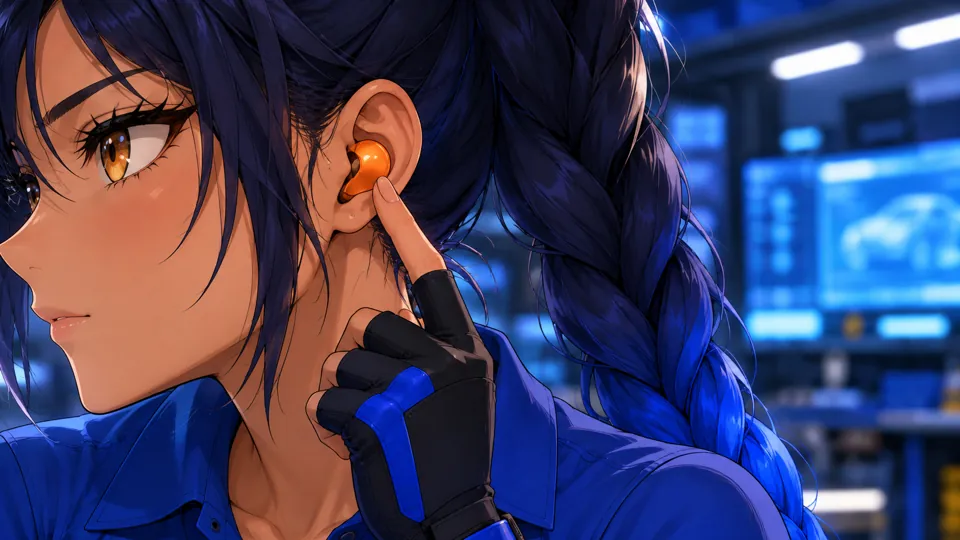
- Face, hair and outfit match the turnaround sheet.
- Hands have five fingers; no text or logos.
- If anything is off, generate again before making the video. The video can only be as good as this frame.
2b · Turn it into video
You · Video
1. Attach 1 image
- Start frame: the image from 2aplus the @liu element from step 4
2. Send this message, word for word
The English text below is the exact prompt used. Copy it unchanged to reproduce the workflow.
@liu is the same adult woman: warm tan skin, amber eyes, deep navy hair in a high long braid with cobalt-blue tips, small orange earpiece on her left ear, cobalt-blue short-sleeve work polo, black cargo trousers, black jacket tied at the waist, blue-black fingerless gloves. Anime illustration style exactly like the references. Extreme close-up of her left ear in profile. Her gloved fingertip taps the small orange earpiece once and a tiny cobalt light on it glows softly; her eyelids lower and her face relaxes into calm. Static macro camera with a very slow push-in, single continuous shot. Negative: no extra people, no text or logos, no outfit change, no sleeveless top, no scene cuts, no camera cuts, correct hands with five fingers, only one earpiece.
3. Settings
- Kling 3.0 image-to-video
- Standard mode, 720p
- 3 seconds
- Sound off
- Single shot (multi-shot off)
AI returns
2c · Check the take and trim it
- The first take was usable.
- Watch the whole clip. If the model cut to another camera angle, changed the outfit or added a second person, generate it again; this happens and is normal.
- Use 0–3 s of the 3-second clip.
- Save it as
shot-2.mp4.
Step 7Shot 3: The radio call
3.6s in the ad · caption: “Every call, crystal clear.”
3a · Make the first frame
You · First frame
1. Attach 4 images
- Pose (working)07_expressions_poses/pose_working.png
- Outfit03_outfits/outfit_work.png
- Expression (determined)07_expressions_poses/expression_determined.png
- Scene05_scenes/scene_workspace.png
2. Send this message, word for word
The English text below is the exact prompt used. Copy it unchanged to reproduce the workflow.
Same adult woman as the reference images: warm tan skin, amber eyes, deep navy hair in a high long braid with cobalt-blue tips, small orange earpiece on her left ear, cobalt-blue short-sleeve work polo, black cargo trousers, black jacket tied at the waist, blue-black fingerless gloves. Anime illustration style exactly like the references. Chest-up shot in the garage, blurred blue monitors behind. She presses the orange earpiece with her gloved left hand and says one short word, eyes firm. Slow push-in, shallow depth of field. Serious, decisive expression, brows lowered; no smile. Create one 16:9 cinematic still frame for this shot. The woman wears the cobalt short-sleeve work polo, never a sleeveless top. Clean anatomy, no text, no logos.
3. Settings
- GPT image model, image-to-image
- 16:9
- 1K
AI returns
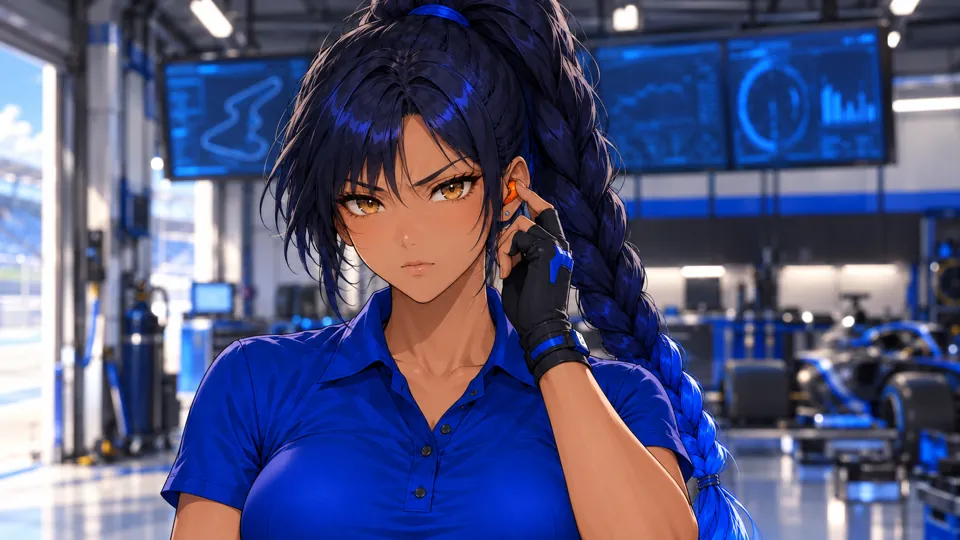
- Face, hair and outfit match the turnaround sheet.
- Hands have five fingers; no text or logos.
- If anything is off, generate again before making the video. The video can only be as good as this frame.
3b · Turn it into video
You · Video
1. Attach 1 image
- Start frame: the image from 3aplus the @liu element from step 4
2. Send this message, word for word
The English text below is the exact prompt used. Copy it unchanged to reproduce the workflow.
@liu is the same adult woman: warm tan skin, amber eyes, deep navy hair in a high long braid with cobalt-blue tips, small orange earpiece on her left ear, cobalt-blue short-sleeve work polo, black cargo trousers, black jacket tied at the waist, blue-black fingerless gloves. Anime illustration style exactly like the references. Chest-up shot in the garage, blurred blue monitors behind. She presses the orange earpiece with her gloved left hand and says one short word, eyes firm. Slow push-in, shallow depth of field. Serious, decisive expression, brows lowered; no smile. Negative: no extra people, no text or logos, no outfit change, no sleeveless top, no scene cuts, correct hands with five fingers.
3. Settings
- Kling 3.0 image-to-video
- Standard mode, 720p
- 4 seconds
- Sound off
- Single shot (multi-shot off)
AI returns
3c · Check the take and trim it
- The first take was usable.
- Watch the whole clip. If the model cut to another camera angle, changed the outfit or added a second person, generate it again; this happens and is normal.
- Use 0.2–3.8 s of the 4-second clip. The first 0.2 s are skipped so the shot starts on movement.
- Save it as
shot-3.mp4.
Step 8Shot 4: Relief
3s in the ad
4a · Make the first frame
You · First frame
1. Attach 3 images
- Outfit03_outfits/outfit_work.png
- Expression (smile)07_expressions_poses/expression_smile.png
- Scene05_scenes/scene_workspace.png
2. Send this message, word for word
The English text below is the exact prompt used. Copy it unchanged to reproduce the workflow.
Same adult woman as the reference images: warm tan skin, amber eyes, deep navy hair in a high long braid with cobalt-blue tips, small orange earpiece on her left ear, cobalt-blue short-sleeve work polo, black cargo trousers, black jacket tied at the waist, blue-black fingerless gloves. Anime illustration style exactly like the references. Medium shot facing her at the workbench. She exhales, her shoulders relax, and a small relieved smile appears as she glances at the camera. Static camera, then a gentle push. Her expression goes from tense to a soft, relieved closed-mouth smile. Create one 16:9 cinematic still frame for this shot. The woman wears the cobalt short-sleeve work polo, never a sleeveless top. Clean anatomy, no text, no logos.
3. Settings
- GPT image model, image-to-image
- 16:9
- 1K
AI returns
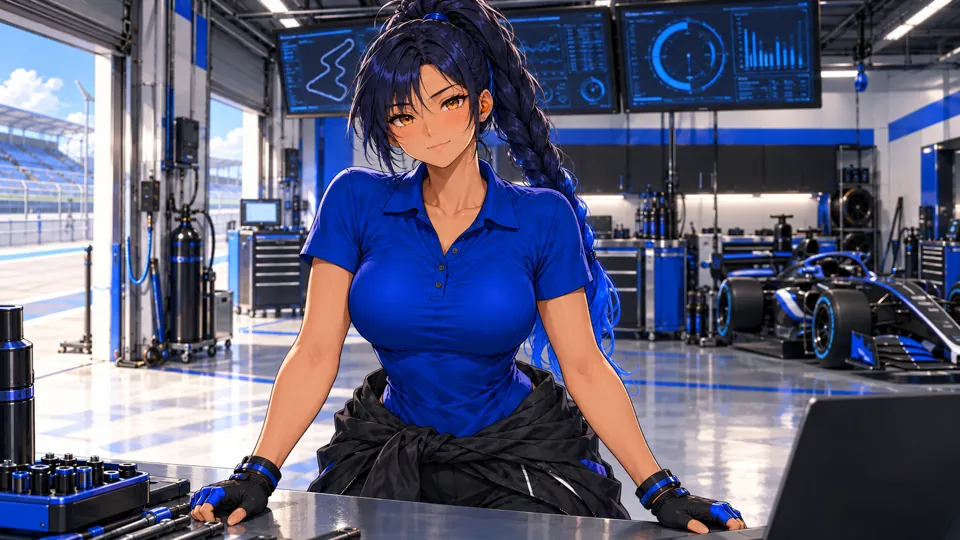
- Face, hair and outfit match the turnaround sheet.
- Hands have five fingers; no text or logos.
- If anything is off, generate again before making the video. The video can only be as good as this frame.
4b · Turn it into video
You · Video
1. Attach 1 image
- Start frame: the image from 4aplus the @liu element from step 4
2. Send this message, word for word
The English text below is the exact prompt used. Copy it unchanged to reproduce the workflow.
@liu is the same adult woman: warm tan skin, amber eyes, deep navy hair in a high long braid with cobalt-blue tips, small orange earpiece on her left ear, cobalt-blue short-sleeve work polo, black cargo trousers, black jacket tied at the waist, blue-black fingerless gloves. Anime illustration style exactly like the references. Medium shot facing her at the workbench. She exhales, her shoulders relax, and a small relieved smile appears as she glances at the camera. Static camera, then a gentle push. Her expression goes from tense to a soft, relieved closed-mouth smile. Negative: no extra people, no text or logos, no outfit change, no sleeveless top, no scene cuts, correct hands with five fingers.
3. Settings
- Kling 3.0 image-to-video
- Standard mode, 720p
- 4 seconds
- Sound off
- Single shot (multi-shot off)
AI returns
4c · Check the take and trim it
- The first take was usable.
- Watch the whole clip. If the model cut to another camera angle, changed the outfit or added a second person, generate it again; this happens and is normal.
- Use 0–3 s of the 4-second clip.
- Save it as
shot-4.mp4.
Step 9Cut the ad
Make a 1920×1080 project at 24 fps and lay the parts end to end with hard cuts (no transitions). The finished ad is 16.1 seconds.
| # | File | Use | Length | Caption |
|---|---|---|---|---|
| 1 | shot-1.mp4 | 0–3 s | 3 s | 120 dB in the pit garage |
| 2 | shot-2.mp4 | 0–3 s | 3 s | One tap. Noise out. |
| 3 | shot-3.mp4 | 0.2–3.8 s | 3.6 s | Every call, crystal clear. |
| 4 | shot-4.mp4 | 0–3 s | 3 s | — |
| 5 | product.png | End card | 3.5 s | PITWAVE / Team Radio Earpiece / One tap. Every call clear. |
Captions
- Bottom left: 110 px from the left, 170 px from the bottom.
- White, bold italic, 54 px (we used Avenir Next).
- On a rounded black box at about 47% opacity.
- Our “Demo ad · fictional product” label is only there because the products are invented; leave it out of yours.
End card
- product.png for 3.5 s with a slow push-in from 100% to about 110%.
- A near-black gradient over the left 60% so the text reads.
- PITWAVE in bold italic, 130 px; Team Radio Earpiece at 52 px; the tagline at 40 px in #f4f06a.
- The text fades in 0.3 s after the card starts, over 0.4 s.
Music and export
- One track under the whole ad: fade in over 0.5 s, fade out over the last 1.5 s. Use music you have the rights to.
- Export H.264 MP4, 1920×1080.
- The Kling clips are 720p; scaling them to 1080p in the edit is fine for social video.
Prefer the command line? The same edit as an ffmpeg script
Put your clips, product.png, music.mp3 and two font files in one folder and run this. We ran it on our own clips and it reproduces the ad above.
The English text below is the exact prompt used. Copy it unchanged to reproduce the workflow.
#!/bin/sh # Cut the PITWAVE ad: 4 shots + a 3.5 s product end card, 1920x1080, 24 fps. # Put these files in one folder first: # shot-1.mp4 the video you kept for "Garage noise" # shot-2.mp4 the video you kept for "One tap" # shot-3.mp4 the video you kept for "The radio call" # shot-4.mp4 the video you kept for "Relief" # product.png the product still # music.mp3 a track you have the rights to use # title.ttf font for captions and the brand (we used Avenir Next Bold Italic) # text.ttf font for the product name and tagline (we used Avenir Next Bold) # Needs an ffmpeg build with the drawtext filter: `ffmpeg -filters | grep drawtext` # must print a line (the static builds linked from ffmpeg.org have it). set -e # 1. Trim each shot, scale it to 1080p and burn in its caption. ffmpeg -y -ss 0 -t 3 -i shot-1.mp4 -an \ -vf "scale=1920:1080:flags=lanczos,fps=24,setsar=1,format=yuv420p,drawtext=fontfile=title.ttf:text='120 dB in the pit garage':fontsize=54:fontcolor=white:x=110:y=h-170:box=1:boxcolor=black@0.47:boxborderw=18" \ -c:v libx264 -crf 17 part-1.mp4 ffmpeg -y -ss 0 -t 3 -i shot-2.mp4 -an \ -vf "scale=1920:1080:flags=lanczos,fps=24,setsar=1,format=yuv420p,drawtext=fontfile=title.ttf:text='One tap. Noise out.':fontsize=54:fontcolor=white:x=110:y=h-170:box=1:boxcolor=black@0.47:boxborderw=18" \ -c:v libx264 -crf 17 part-2.mp4 ffmpeg -y -ss 0.2 -t 3.6 -i shot-3.mp4 -an \ -vf "scale=1920:1080:flags=lanczos,fps=24,setsar=1,format=yuv420p,drawtext=fontfile=title.ttf:text='Every call, crystal clear.':fontsize=54:fontcolor=white:x=110:y=h-170:box=1:boxcolor=black@0.47:boxborderw=18" \ -c:v libx264 -crf 17 part-3.mp4 ffmpeg -y -ss 0 -t 3 -i shot-4.mp4 -an \ -vf "scale=1920:1080:flags=lanczos,fps=24,setsar=1,format=yuv420p" \ -c:v libx264 -crf 17 part-4.mp4 # 2. End card: the product still with a slow push-in, a soft dark fade on the left and the brand. ffmpeg -y -loop 1 -i product.png -f lavfi -i "color=c=0x080A10:s=1920x1080:r=24" -filter_complex \ "[0:v]scale=3840:2160,zoompan=z='1+0.0012*on':x='iw/2-(iw/zoom/2)':y='ih/2-(ih/zoom/2)':d=84:s=1920x1080:fps=24[p];[1:v]format=rgba,geq=r='r(X,Y)':g='g(X,Y)':b='b(X,Y)':a='if(lt(X,1190),215*pow(1-X/1190,1.4),0)'[s];[p][s]overlay=0:0:shortest=1,drawtext=fontfile=title.ttf:text='PITWAVE':fontsize=130:fontcolor=white:x=130:y=330:alpha='min(1,max(0,(t-0.3)/0.4))',drawtext=fontfile=text.ttf:text='Team Radio Earpiece':fontsize=52:fontcolor=0xCDD7EB:x=136:y=490:alpha='min(1,max(0,(t-0.3)/0.4))',drawtext=fontfile=text.ttf:text='One tap. Every call clear.':fontsize=40:fontcolor=0xf4f06a:x=136:y=575:alpha='min(1,max(0,(t-0.3)/0.4))',format=yuv420p" \ -t 3.5 -c:v libx264 -crf 17 end-card.mp4 # 3. Join the parts with hard cuts. printf "file 'part-1.mp4'\nfile 'part-2.mp4'\nfile 'part-3.mp4'\nfile 'part-4.mp4'\nfile 'end-card.mp4'\n" > parts.txt ffmpeg -y -f concat -safe 0 -i parts.txt -c copy ad-silent.mp4 # 4. Lay the music under it: fade in 0.5 s, fade out over the last 1.5 s. ffmpeg -y -i ad-silent.mp4 -i music.mp3 -filter_complex \ "[1:a]atrim=0:16.1,asetpts=PTS-STARTPTS,afade=t=in:st=0:d=0.5,afade=t=out:st=14.6:d=1.5,volume=0.9[a]" \ -map 0:v -map "[a]" -c:v copy -c:a aac -b:a 192k -t 16.1 -movflags +faststart liu-xialan-ad.mp4
Make your own ad with Liu Xialan
Follow the steps above with your own product: swap the product still and the shot ideas, keep the character description and the character reference.