Demo ad · fictional product · 12.5 seconds, silent
Home decor · step-by-step tutorial
Astral Projector AI ad with Ye Lanxing
A star-path sorceress turns an astrolabe projector and fills her study with stars. Below is every step we took, in order: which pack files we uploaded, the exact messages we sent to the AI, the settings, what came back, which takes we threw away, and how we cut the ad. Download the pack and you can make the same ad.
- Character
- Ye Lanxing
- Product
- STARPATH Astral Projector (fictional)
- Length
- 3 shots + product end card, 12.5s
- Generations
- 4 images, 4 videos (1 dropped)
What you need
- 1
Ye Lanxing's character pack
Free download, no account needed. Unzip it; the folders are numbered (01_character_reference, 02_turnaround_views …).
- 2
An image model that takes several reference images
We used GPT image model, image-to-image through the KIE API. Any image model that accepts 2–4 reference images plus a text message works the same way.
- 3
Kling 3.0 image-to-video
We used Kling 3.0 image-to-video (720p, no sound) with a character element (a saved set of reference images). Other image-to-video models work too; results will differ.
- 4
A video editor
CapCut, DaVinci Resolve, Premiere or ffmpeg. You only trim, add captions, add an end card and music.
Step 1Unzip the pack and find these files
The ad uses 8 of the pack's images. Nothing else was uploaded except the product still you make in step 3. Paths are exactly as they appear in the zip.
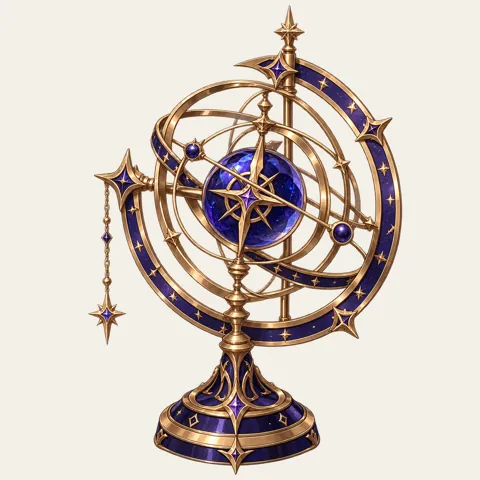 04_props/prop_role.pngUsed for: Product still, Shot 1 first frame
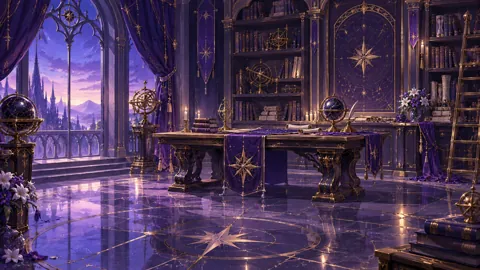 05_scenes/scene_workspace.pngUsed for: Product still, Shot 1 first frame, Shot 2 first frame, Shot 3 first frame
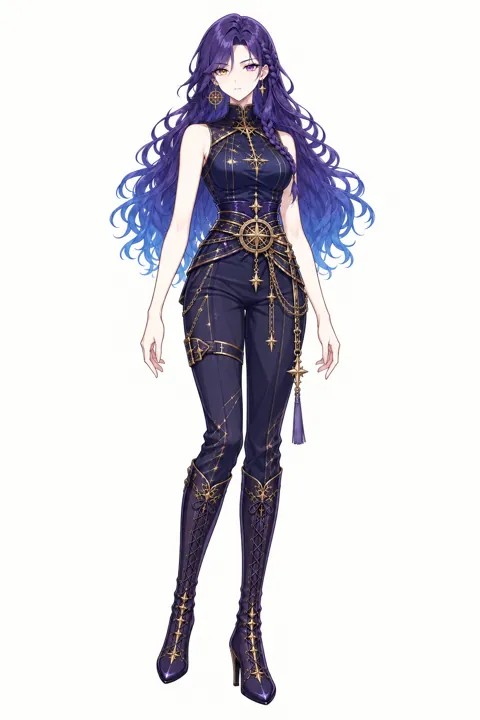 03_outfits/outfit_work.pngUsed for: Character reference (video), Shot 1 first frame, Shot 2 first frame, Shot 3 first frame
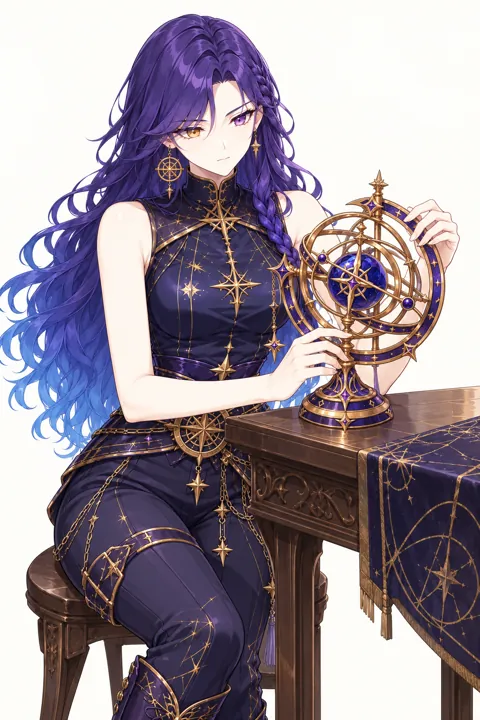 07_expressions_poses/pose_working.pngUsed for: Character reference (video)
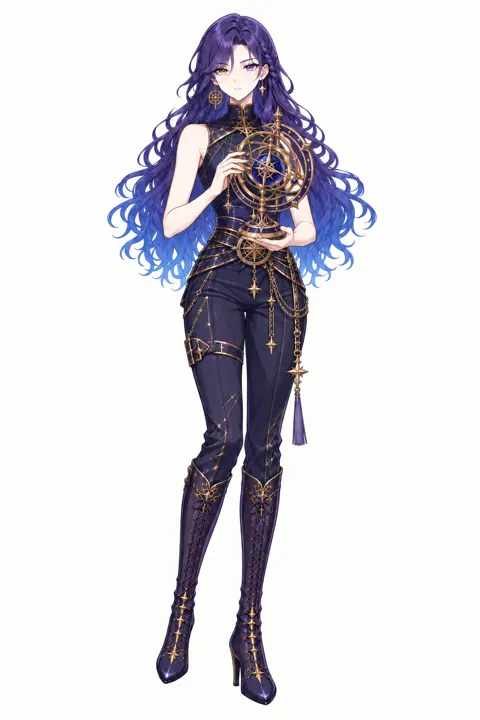 07_expressions_poses/pose_presenting.pngUsed for: Character reference (video)
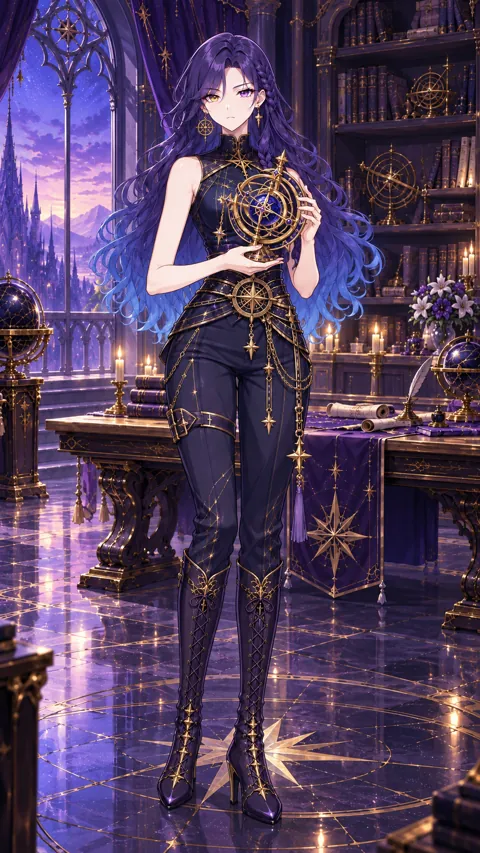 08_video_starters/video_starter_portrait.pngUsed for: Character reference (video)
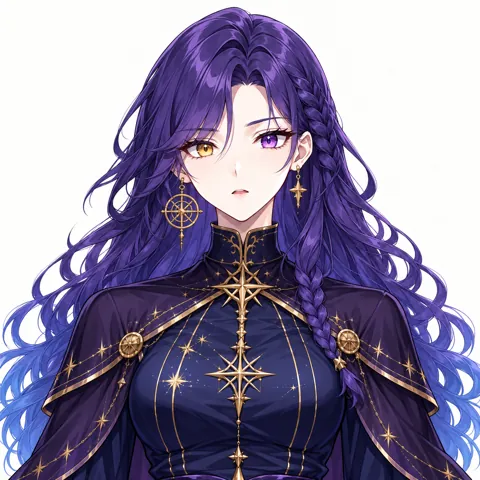 07_expressions_poses/expression_surprised.pngUsed for: Shot 2 first frame
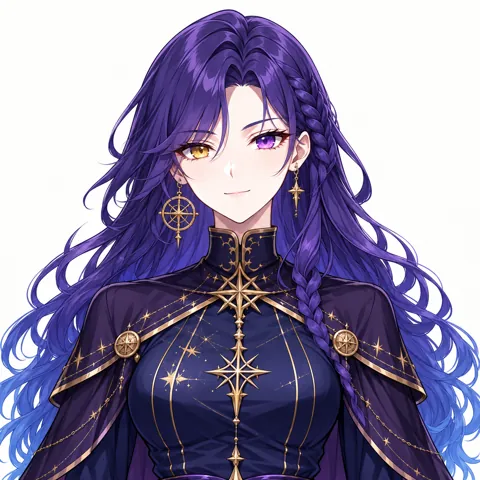 07_expressions_poses/expression_smile.pngUsed for: Shot 3 first frame
Step 2Describe the character once
Open 01_character_reference/model_sheet.png and write down what must never change: skin, eyes, hair, outfit and art style. This paragraph goes, word for word, at the start of every message in the steps below (they already include it, so you can copy them as they are). For the video model the opening words become @lan is the same …, which points at the character reference from step 4.
The English text below is the exact prompt used. Copy it unchanged to reproduce the workflow.
Same 25-year-old adult woman as the reference images: fair skin, long wavy deep-purple hair fading to star-blue tips with a slim braid on her left; heterochromia: her right eye gold, her left eye purple; large gold astrolabe earring on her right ear and small gold star earring on her left; never mirror or equalize the eyes. Sleeveless high-collar navy top with gold star embroidery, dark fitted trousers, knee-high navy boots. Anime illustration style exactly like the references.
The English text below is the exact prompt used. Copy it unchanged to reproduce the workflow.
She wears the sleeveless high-collar navy top with gold star embroidery; her right eye is gold and her left eye purple.
The English text below is the exact prompt used. Copy it unchanged to reproduce the workflow.
no extra people, no text or logos, no outfit change, no scene cuts, no camera cuts, correct hands with five fingers, no mirrored eye colours
Step 3Make the product still
Make one picture of the product first. You reuse it for the end card, so the product looks the same everywhere. Never ask the model to write the brand name; add text in the edit.
You · Product still
1. Attach 2 images
- Prop04_props/prop_role.png
- Scene05_scenes/scene_workspace.png
2. Send this message, word for word
The English text below is the exact prompt used. Copy it unchanged to reproduce the workflow.
Anime illustration style exactly like the references. Product shot in exactly the same art style as the references. A desk star projector shaped like the same gold and navy astrolabe as the first reference, its rings softly glowing, on a dark wooden desk in a dim violet study, faint star points projected on the wall behind. Generous empty space on the left for a title. 16:9 still. No people, no text, no logos.
3. Settings
- GPT image model, image-to-image
- 16:9
- 1K
AI returns
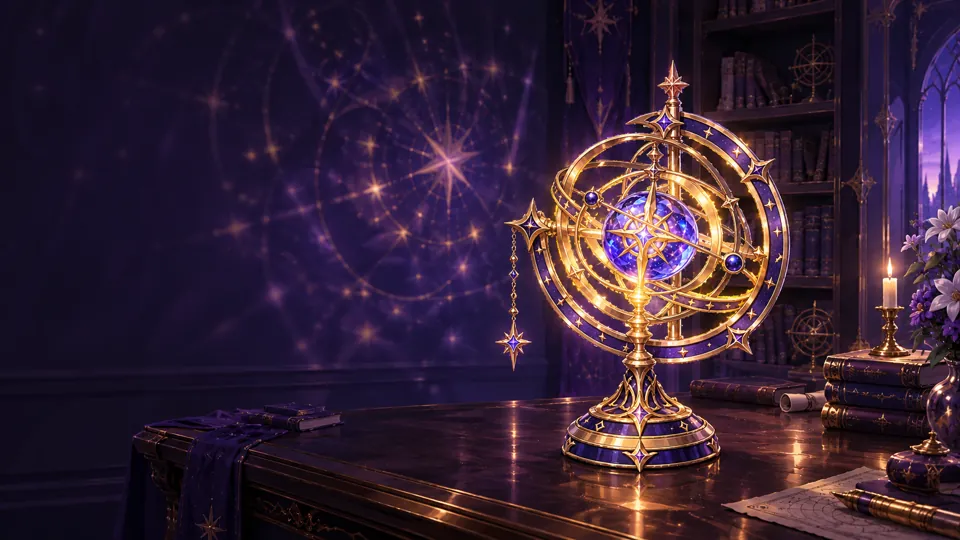
- Same art style as the pack.
- No text, logos or people in the image.
- Empty space on the left for the brand name.
Step 4Save the character reference for video
In Kling 3.0 we saved these 4 images as one character element named lan with the description below. Every video message then starts with @lan, and Kling keeps the face and outfit from these images. If your video tool has no such feature, skip this step: the first frame and the character description still carry most of the look.
- Outfit03_outfits/outfit_work.png
- Pose (working)07_expressions_poses/pose_working.png
- Pose (presenting)07_expressions_poses/pose_presenting.png
- Video starter (portrait)08_video_starters/video_starter_portrait.png
The English text below is the exact prompt used. Copy it unchanged to reproduce the workflow.
lan
The English text below is the exact prompt used. Copy it unchanged to reproduce the workflow.
25-year-old adult woman, sleeveless high-collar navy top with gold star embroidery, dark fitted trousers, knee-high navy boots
Step 5Shot 1: Turn the ring
3s in the ad · caption: “Turn the ring”
1a · Make the first frame
You · First frame
1. Attach 3 images
- Prop04_props/prop_role.png
- Scene05_scenes/scene_workspace.png
- Outfit03_outfits/outfit_work.png
2. Send this message, word for word
The English text below is the exact prompt used. Copy it unchanged to reproduce the workflow.
Same 25-year-old adult woman as the reference images: fair skin, long wavy deep-purple hair fading to star-blue tips with a slim braid on her left; heterochromia: her right eye gold, her left eye purple; large gold astrolabe earring on her right ear and small gold star earring on her left; never mirror or equalize the eyes. Sleeveless high-collar navy top with gold star embroidery, dark fitted trousers, knee-high navy boots. Anime illustration style exactly like the references. Close-up on the dark desk in a dim violet study: her hand turns the outer ring of the gold astrolabe projector and its blue core starts to glow. Create one 16:9 cinematic still frame for this shot. She wears the sleeveless high-collar navy top with gold star embroidery; her right eye is gold and her left eye purple. Clean anatomy, no text, no logos.
3. Settings
- GPT image model, image-to-image
- 16:9
- 1K
AI returns
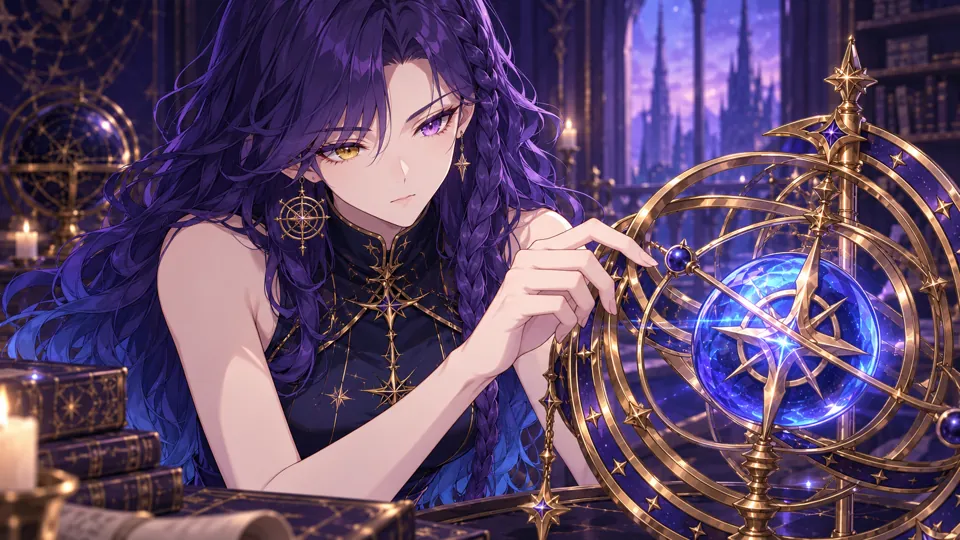
- Face, hair and outfit match the turnaround sheet.
- Hands have five fingers; no text or logos.
- If anything is off, generate again before making the video. The video can only be as good as this frame.
1b · Turn it into video
You · Video
1. Attach 1 image
- Start frame: the image from 1aplus the @lan element from step 4
2. Send this message, word for word
The English text below is the exact prompt used. Copy it unchanged to reproduce the workflow.
@lan is the same 25-year-old adult woman: fair skin, long wavy deep-purple hair fading to star-blue tips with a slim braid on her left; heterochromia: her right eye gold, her left eye purple; large gold astrolabe earring on her right ear and small gold star earring on her left; never mirror or equalize the eyes. Sleeveless high-collar navy top with gold star embroidery, dark fitted trousers, knee-high navy boots. Anime illustration style exactly like the references. Close-up on a dark desk in a dim violet study. Her hand turns the gold ring of the astrolabe projector and its blue core begins to glow brighter. Static camera, very slow push-in, single continuous shot. Negative: no extra people, no text or logos, no outfit change, no scene cuts, no camera cuts, correct hands with five fingers, no mirrored eye colours.
3. Settings
- Kling 3.0 image-to-video
- Standard mode, 720p
- 3 seconds
- Sound off
- Single shot (multi-shot off)
AI returns
1c · Check the take and trim it
- The first take was usable.
- Watch the whole clip. If the model cut to another camera angle, changed the outfit or added a second person, generate it again; this happens and is normal.
- Use 0–3 s of the 3-second clip.
- Save it as
shot-1.mp4.
Step 6Shot 2: Stars everywhere
3s in the ad · caption: “The whole sky, indoors”
2a · Make the first frame
You · First frame
1. Attach 3 images
- Expression (surprised)07_expressions_poses/expression_surprised.png
- Outfit03_outfits/outfit_work.png
- Scene05_scenes/scene_workspace.png
2. Send this message, word for word
The English text below is the exact prompt used. Copy it unchanged to reproduce the workflow.
Same 25-year-old adult woman as the reference images: fair skin, long wavy deep-purple hair fading to star-blue tips with a slim braid on her left; heterochromia: her right eye gold, her left eye purple; large gold astrolabe earring on her right ear and small gold star earring on her left; never mirror or equalize the eyes. Sleeveless high-collar navy top with gold star embroidery, dark fitted trousers, knee-high navy boots. Anime illustration style exactly like the references. Medium shot in the darkened study: hundreds of small star points spread across the walls and ceiling around her, she looks up in wonder, starlight on her face. Create one 16:9 cinematic still frame for this shot. She wears the sleeveless high-collar navy top with gold star embroidery; her right eye is gold and her left eye purple. Clean anatomy, no text, no logos.
3. Settings
- GPT image model, image-to-image
- 16:9
- 1K
AI returns
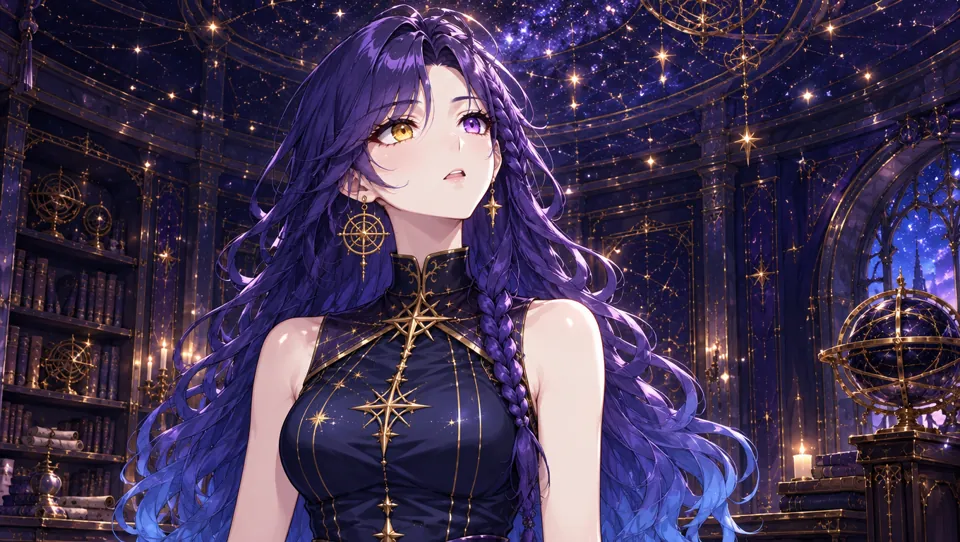
- Face, hair and outfit match the turnaround sheet.
- Hands have five fingers; no text or logos.
- If anything is off, generate again before making the video. The video can only be as good as this frame.
2b · Turn it into video
You · Video
1. Attach 1 image
- Start frame: the image from 2aplus the @lan element from step 4
2. Send this message, word for word
The English text below is the exact prompt used. Copy it unchanged to reproduce the workflow.
@lan is the same 25-year-old adult woman: fair skin, long wavy deep-purple hair fading to star-blue tips with a slim braid on her left; heterochromia: her right eye gold, her left eye purple; large gold astrolabe earring on her right ear and small gold star earring on her left; never mirror or equalize the eyes. Sleeveless high-collar navy top with gold star embroidery, dark fitted trousers, knee-high navy boots. Anime illustration style exactly like the references. Medium shot in a darkened study. Small star points spread across the walls and ceiling and slowly drift; she looks up in wonder. Static camera, gentle push-in, single continuous shot. Negative: no extra people, no text or logos, no outfit change, no scene cuts, no camera cuts, correct hands with five fingers, no mirrored eye colours.
3. Settings
- Kling 3.0 image-to-video
- Standard mode, 720p
- 3 seconds
- Sound off
- Single shot (multi-shot off)
AI returns
2c · Check the take and trim it
- Take 1: Dropped: at 1.5 s the model cut to a distant full-body shot.
- Take 2: kept.
- Watch the whole clip. If the model cut to another camera angle, changed the outfit or added a second person, generate it again; this happens and is normal.
- Use 0–3 s of the 3-second clip.
- Save it as
shot-2.mp4.
Step 7Shot 3: Goodnight
3s in the ad · caption: “Goodnight, stars”
3a · Make the first frame
You · First frame
1. Attach 3 images
- Expression (smile)07_expressions_poses/expression_smile.png
- Outfit03_outfits/outfit_work.png
- Scene05_scenes/scene_workspace.png
2. Send this message, word for word
The English text below is the exact prompt used. Copy it unchanged to reproduce the workflow.
Same 25-year-old adult woman as the reference images: fair skin, long wavy deep-purple hair fading to star-blue tips with a slim braid on her left; heterochromia: her right eye gold, her left eye purple; large gold astrolabe earring on her right ear and small gold star earring on her left; never mirror or equalize the eyes. Sleeveless high-collar navy top with gold star embroidery, dark fitted trousers, knee-high navy boots. Anime illustration style exactly like the references. Chest-up shot in the star-filled dark study: soft blue starlight on her face, she smiles calmly toward the viewer, her gold right eye and purple left eye clearly visible. Create one 16:9 cinematic still frame for this shot. She wears the sleeveless high-collar navy top with gold star embroidery; her right eye is gold and her left eye purple. Clean anatomy, no text, no logos.
3. Settings
- GPT image model, image-to-image
- 16:9
- 1K
AI returns
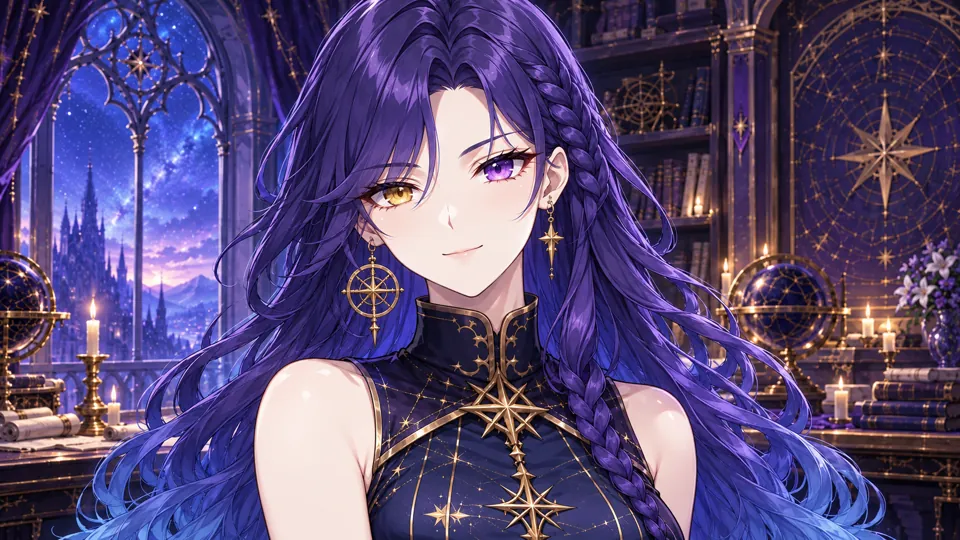
- Face, hair and outfit match the turnaround sheet.
- Hands have five fingers; no text or logos.
- If anything is off, generate again before making the video. The video can only be as good as this frame.
3b · Turn it into video
You · Video
1. Attach 1 image
- Start frame: the image from 3aplus the @lan element from step 4
2. Send this message, word for word
The English text below is the exact prompt used. Copy it unchanged to reproduce the workflow.
@lan is the same 25-year-old adult woman: fair skin, long wavy deep-purple hair fading to star-blue tips with a slim braid on her left; heterochromia: her right eye gold, her left eye purple; large gold astrolabe earring on her right ear and small gold star earring on her left; never mirror or equalize the eyes. Sleeveless high-collar navy top with gold star embroidery, dark fitted trousers, knee-high navy boots. Anime illustration style exactly like the references. Chest-up shot in a star-filled dark room. Starlight drifts across her face and she turns to the camera with a calm smile. Static camera, single continuous shot. Negative: no extra people, no text or logos, no outfit change, no scene cuts, no camera cuts, correct hands with five fingers, no mirrored eye colours.
3. Settings
- Kling 3.0 image-to-video
- Standard mode, 720p
- 3 seconds
- Sound off
- Single shot (multi-shot off)
AI returns
3c · Check the take and trim it
- The first take was usable.
- Watch the whole clip. If the model cut to another camera angle, changed the outfit or added a second person, generate it again; this happens and is normal.
- Use 0–3 s of the 3-second clip.
- Save it as
shot-3.mp4.
Step 8Cut the ad
Make a 1920×1080 project at 24 fps and lay the parts end to end with hard cuts (no transitions). The finished ad is 12.5 seconds.
| # | File | Use | Length | Caption |
|---|---|---|---|---|
| 1 | shot-1.mp4 | 0–3 s | 3 s | Turn the ring |
| 2 | shot-2.mp4 | 0–3 s | 3 s | The whole sky, indoors |
| 3 | shot-3.mp4 | 0–3 s | 3 s | Goodnight, stars |
| 4 | product.png | End card | 3.5 s | STARPATH / Astral Projector / Bring the night sky home. |
Captions
- Bottom left: 110 px from the left, 170 px from the bottom.
- White, bold italic, 54 px (we used Avenir Next).
- On a rounded black box at about 47% opacity.
- Our “Demo ad · fictional product” label is only there because the products are invented; leave it out of yours.
End card
- product.png for 3.5 s with a slow push-in from 100% to about 110%.
- A near-black gradient over the left 60% so the text reads.
- STARPATH in bold italic, 118 px; Astral Projector at 52 px; the tagline at 40 px in #c4aaff.
- The text fades in 0.3 s after the card starts, over 0.4 s.
Music and export
- One track under the whole ad: fade in over 0.5 s, fade out over the last 1.5 s. Use music you have the rights to.
- Export H.264 MP4, 1920×1080.
- The Kling clips are 720p; scaling them to 1080p in the edit is fine for social video.
Prefer the command line? The same edit as an ffmpeg script
Put your clips, product.png, music.mp3 and two font files in one folder and run this. We ran it on our own clips and it reproduces the ad above.
The English text below is the exact prompt used. Copy it unchanged to reproduce the workflow.
#!/bin/sh # Cut the STARPATH ad: 3 shots + a 3.5 s product end card, 1920x1080, 24 fps. # Put these files in one folder first: # shot-1.mp4 the video you kept for "Turn the ring" # shot-2.mp4 the video you kept for "Stars everywhere" # shot-3.mp4 the video you kept for "Goodnight" # product.png the product still # music.mp3 a track you have the rights to use # title.ttf font for captions and the brand (we used Avenir Next Bold Italic) # text.ttf font for the product name and tagline (we used Avenir Next Bold) # Needs an ffmpeg build with the drawtext filter: `ffmpeg -filters | grep drawtext` # must print a line (the static builds linked from ffmpeg.org have it). set -e # 1. Trim each shot, scale it to 1080p and burn in its caption. ffmpeg -y -ss 0 -t 3 -i shot-1.mp4 -an \ -vf "scale=1920:1080:flags=lanczos,fps=24,setsar=1,format=yuv420p,drawtext=fontfile=title.ttf:text='Turn the ring':fontsize=54:fontcolor=white:x=110:y=h-170:box=1:boxcolor=black@0.47:boxborderw=18" \ -c:v libx264 -crf 17 part-1.mp4 ffmpeg -y -ss 0 -t 3 -i shot-2.mp4 -an \ -vf "scale=1920:1080:flags=lanczos,fps=24,setsar=1,format=yuv420p,drawtext=fontfile=title.ttf:text='The whole sky, indoors':fontsize=54:fontcolor=white:x=110:y=h-170:box=1:boxcolor=black@0.47:boxborderw=18" \ -c:v libx264 -crf 17 part-2.mp4 ffmpeg -y -ss 0 -t 3 -i shot-3.mp4 -an \ -vf "scale=1920:1080:flags=lanczos,fps=24,setsar=1,format=yuv420p,drawtext=fontfile=title.ttf:text='Goodnight, stars':fontsize=54:fontcolor=white:x=110:y=h-170:box=1:boxcolor=black@0.47:boxborderw=18" \ -c:v libx264 -crf 17 part-3.mp4 # 2. End card: the product still with a slow push-in, a soft dark fade on the left and the brand. ffmpeg -y -loop 1 -i product.png -f lavfi -i "color=c=0x080A10:s=1920x1080:r=24" -filter_complex \ "[0:v]scale=3840:2160,zoompan=z='1+0.0012*on':x='iw/2-(iw/zoom/2)':y='ih/2-(ih/zoom/2)':d=84:s=1920x1080:fps=24[p];[1:v]format=rgba,geq=r='r(X,Y)':g='g(X,Y)':b='b(X,Y)':a='if(lt(X,1190),215*pow(1-X/1190,1.4),0)'[s];[p][s]overlay=0:0:shortest=1,drawtext=fontfile=title.ttf:text='STARPATH':fontsize=118:fontcolor=white:x=130:y=342:alpha='min(1,max(0,(t-0.3)/0.4))',drawtext=fontfile=text.ttf:text='Astral Projector':fontsize=52:fontcolor=0xCDD7EB:x=136:y=490:alpha='min(1,max(0,(t-0.3)/0.4))',drawtext=fontfile=text.ttf:text='Bring the night sky home.':fontsize=40:fontcolor=0xc4aaff:x=136:y=575:alpha='min(1,max(0,(t-0.3)/0.4))',format=yuv420p" \ -t 3.5 -c:v libx264 -crf 17 end-card.mp4 # 3. Join the parts with hard cuts. printf "file 'part-1.mp4'\nfile 'part-2.mp4'\nfile 'part-3.mp4'\nfile 'end-card.mp4'\n" > parts.txt ffmpeg -y -f concat -safe 0 -i parts.txt -c copy ad-silent.mp4 # 4. Lay the music under it: fade in 0.5 s, fade out over the last 1.5 s. ffmpeg -y -i ad-silent.mp4 -i music.mp3 -filter_complex \ "[1:a]atrim=0:12.5,asetpts=PTS-STARTPTS,afade=t=in:st=0:d=0.5,afade=t=out:st=11:d=1.5,volume=0.9[a]" \ -map 0:v -map "[a]" -c:v copy -c:a aac -b:a 192k -t 12.5 -movflags +faststart ye-lanxing-ad.mp4
Make your own ad with Ye Lanxing
Follow the steps above with your own product: swap the product still and the shot ideas, keep the character description and the character reference.