Demo ad · fictional product · 12.5 seconds, silent
Home and garden · step-by-step tutorial
Bonsai Starter Kit AI ad with Song Bo
A bonsai master trims, turns and admires a small juniper in his sunlit workshop. Below is every step we took, in order: which pack files we uploaded, the exact messages we sent to the AI, the settings, what came back, which takes we threw away, and how we cut the ad. Download the pack and you can make the same ad.
- Character
- Song Bo
- Product
- QUIET PINE Bonsai Starter Kit (fictional)
- Length
- 3 shots + product end card, 12.5s
- Generations
- 4 images, 3 videos
What you need
- 1
Song Bo's character pack
Free download, no account needed. Unzip it; the folders are numbered (01_character_reference, 02_turnaround_views …).
- 2
An image model that takes several reference images
We used GPT image model, image-to-image through the KIE API. Any image model that accepts 2–4 reference images plus a text message works the same way.
- 3
Kling 3.0 image-to-video
We used Kling 3.0 image-to-video (720p, no sound) with a character element (a saved set of reference images). Other image-to-video models work too; results will differ.
- 4
A video editor
CapCut, DaVinci Resolve, Premiere or ffmpeg. You only trim, add captions, add an end card and music.
Step 1Unzip the pack and find these files
The ad uses 8 of the pack's images. Nothing else was uploaded except the product still you make in step 3. Paths are exactly as they appear in the zip.
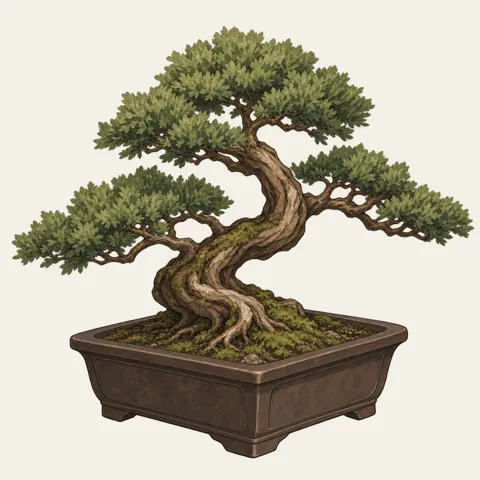 04_props/prop_role.pngUsed for: Product still, Shot 1 first frame
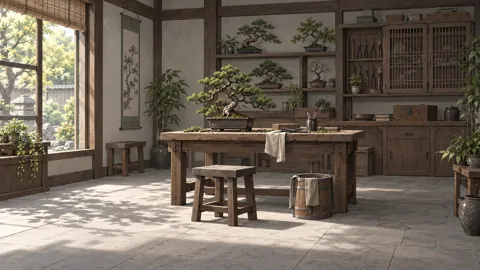 05_scenes/scene_workspace.pngUsed for: Product still, Shot 1 first frame, Shot 2 first frame, Shot 3 first frame
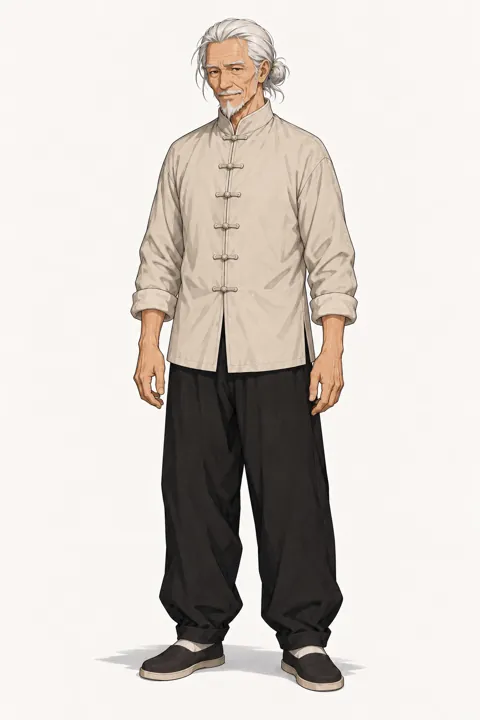 03_outfits/outfit_work.pngUsed for: Character reference (video), Shot 2 first frame, Shot 3 first frame
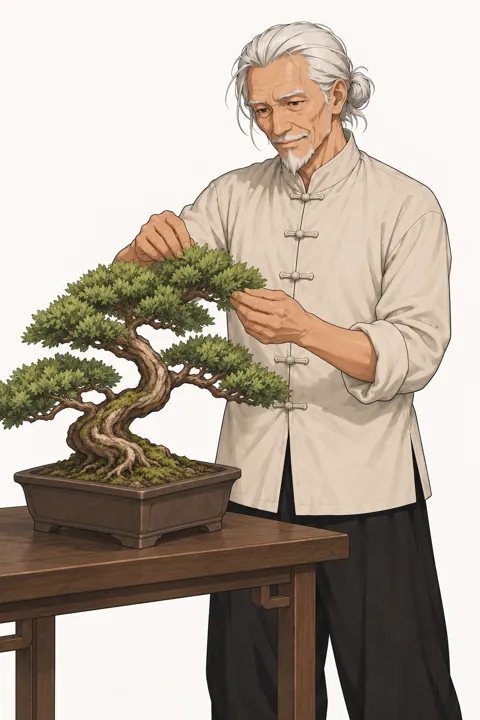 07_expressions_poses/pose_working.pngUsed for: Character reference (video), Shot 2 first frame
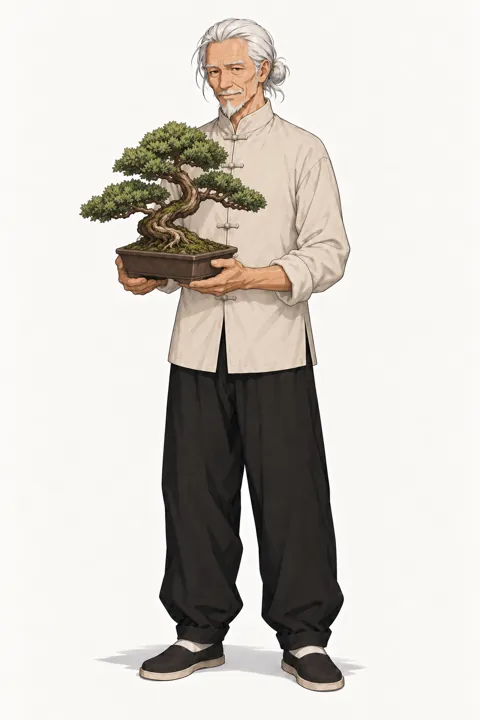 07_expressions_poses/pose_presenting.pngUsed for: Character reference (video)
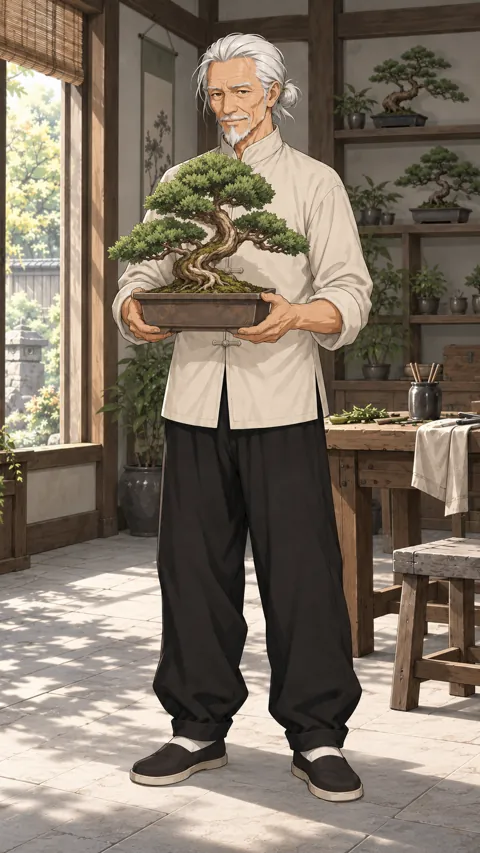 08_video_starters/video_starter_portrait.pngUsed for: Character reference (video)
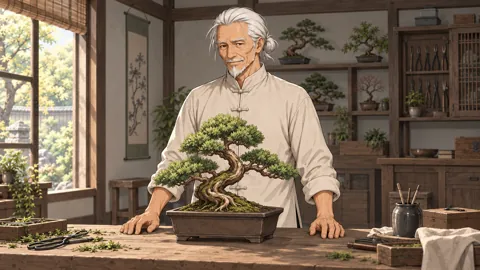 08_video_starters/video_starter_landscape.pngUsed for: Shot 1 first frame
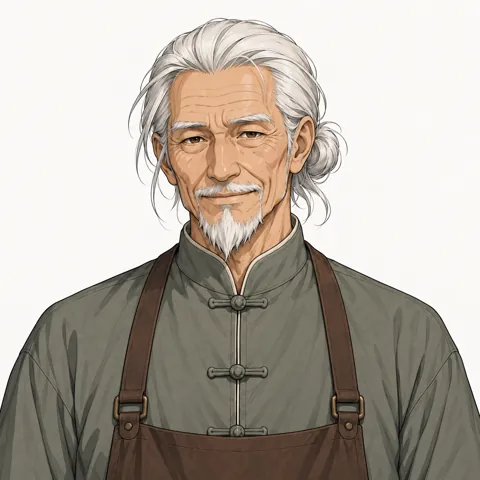 07_expressions_poses/expression_smile.pngUsed for: Shot 3 first frame
Step 2Describe the character once
Open 01_character_reference/model_sheet.png and write down what must never change: skin, eyes, hair, outfit and art style. This paragraph goes, word for word, at the start of every message in the steps below (they already include it, so you can copy them as they are). For the video model the opening words become @song is the same …, which points at the character reference from step 4.
The English text below is the exact prompt used. Copy it unchanged to reproduce the workflow.
Same elderly man about seventy as the reference images: warm tan weathered skin, narrow brown eyes, white swept-back hair tied in a small low bun, white moustache and short pointed beard, visible forehead and eye wrinkles; keep his age, never make him younger. Cream mandarin-collar shirt with knot buttons, black wide trousers. Anime illustration style exactly like the references.
The English text below is the exact prompt used. Copy it unchanged to reproduce the workflow.
He wears the cream mandarin-collar shirt with knot buttons and keeps his age of about seventy.
The English text below is the exact prompt used. Copy it unchanged to reproduce the workflow.
no extra people, no text or logos, no outfit change, no scene cuts, no camera cuts, correct hands with five fingers
Step 3Make the product still
Make one picture of the product first. You reuse it for the end card, so the product looks the same everywhere. Never ask the model to write the brand name; add text in the edit.
You · Product still
1. Attach 2 images
- Prop04_props/prop_role.png
- Scene05_scenes/scene_workspace.png
2. Send this message, word for word
The English text below is the exact prompt used. Copy it unchanged to reproduce the workflow.
Anime illustration style exactly like the references. Product shot in exactly the same art style as the references. The same small juniper bonsai with a curved trunk in the same brown rectangular ceramic pot as the first reference, with small black pruning shears and a tiny rake beside it on a weathered wooden table in a calm sunlit workshop. Generous empty space on the left for a title. 16:9 still. No people, no text, no logos.
3. Settings
- GPT image model, image-to-image
- 16:9
- 1K
AI returns
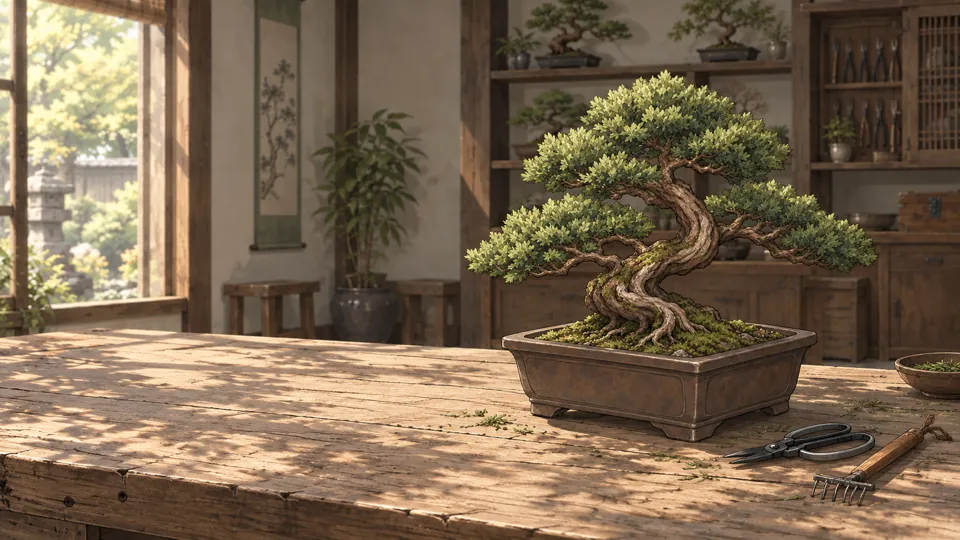
- Same art style as the pack.
- No text, logos or people in the image.
- Empty space on the left for the brand name.
Step 4Save the character reference for video
In Kling 3.0 we saved these 4 images as one character element named song with the description below. Every video message then starts with @song, and Kling keeps the face and outfit from these images. If your video tool has no such feature, skip this step: the first frame and the character description still carry most of the look.
- Outfit03_outfits/outfit_work.png
- Pose (working)07_expressions_poses/pose_working.png
- Pose (presenting)07_expressions_poses/pose_presenting.png
- Video starter (portrait)08_video_starters/video_starter_portrait.png
The English text below is the exact prompt used. Copy it unchanged to reproduce the workflow.
song
The English text below is the exact prompt used. Copy it unchanged to reproduce the workflow.
elderly man about seventy, cream mandarin-collar shirt with knot buttons, black wide trousers
Step 5Shot 1: One small cut
3s in the ad · caption: “One small cut”
1a · Make the first frame
You · First frame
1. Attach 3 images
- Prop04_props/prop_role.png
- Scene05_scenes/scene_workspace.png
- Video starter (landscape)08_video_starters/video_starter_landscape.png
2. Send this message, word for word
The English text below is the exact prompt used. Copy it unchanged to reproduce the workflow.
Same elderly man about seventy as the reference images: warm tan weathered skin, narrow brown eyes, white swept-back hair tied in a small low bun, white moustache and short pointed beard, visible forehead and eye wrinkles; keep his age, never make him younger. Cream mandarin-collar shirt with knot buttons, black wide trousers. Anime illustration style exactly like the references. Close-up on the wooden workbench: his weathered hands hold small black pruning shears at a tiny branch of the juniper bonsai, soft morning light. Create one 16:9 cinematic still frame for this shot. He wears the cream mandarin-collar shirt with knot buttons and keeps his age of about seventy. Clean anatomy, no text, no logos.
3. Settings
- GPT image model, image-to-image
- 16:9
- 1K
AI returns
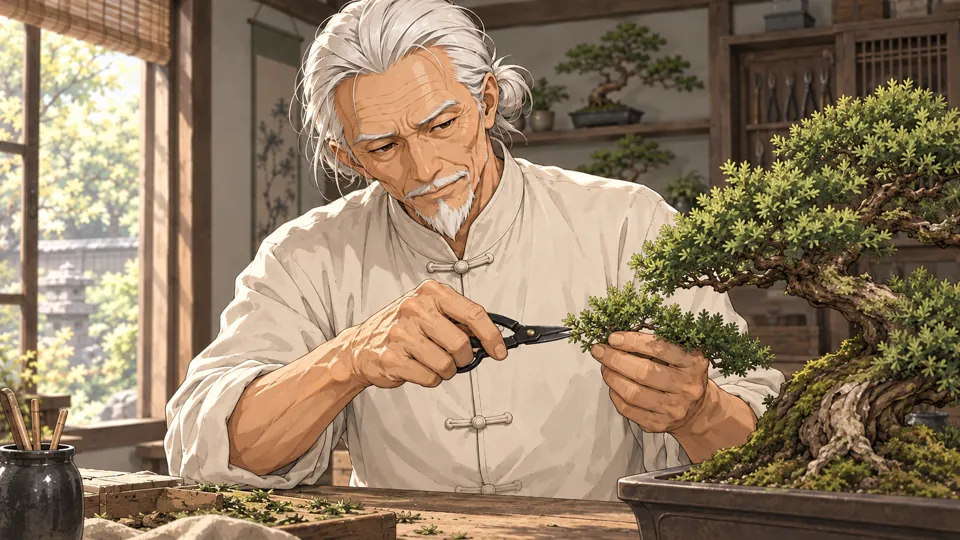
- Face, hair and outfit match the turnaround sheet.
- Hands have five fingers; no text or logos.
- If anything is off, generate again before making the video. The video can only be as good as this frame.
1b · Turn it into video
You · Video
1. Attach 1 image
- Start frame: the image from 1aplus the @song element from step 4
2. Send this message, word for word
The English text below is the exact prompt used. Copy it unchanged to reproduce the workflow.
@song is the same elderly man about seventy: warm tan weathered skin, narrow brown eyes, white swept-back hair tied in a small low bun, white moustache and short pointed beard, visible forehead and eye wrinkles; keep his age, never make him younger. Cream mandarin-collar shirt with knot buttons, black wide trousers. Anime illustration style exactly like the references. Close-up on a wooden workbench. His weathered hands snip one tiny branch of the bonsai with small black shears and the clipping falls. Static camera, very slow push-in, single continuous shot. Negative: no extra people, no text or logos, no outfit change, no scene cuts, no camera cuts, correct hands with five fingers.
3. Settings
- Kling 3.0 image-to-video
- Standard mode, 720p
- 3 seconds
- Sound off
- Single shot (multi-shot off)
AI returns
1c · Check the take and trim it
- The first take was usable.
- Watch the whole clip. If the model cut to another camera angle, changed the outfit or added a second person, generate it again; this happens and is normal.
- Use 0–3 s of the 3-second clip.
- Save it as
shot-1.mp4.
Step 6Shot 2: Turn and study
3s in the ad · caption: “Turn it. Look again.”
2a · Make the first frame
You · First frame
1. Attach 3 images
- Pose (working)07_expressions_poses/pose_working.png
- Outfit03_outfits/outfit_work.png
- Scene05_scenes/scene_workspace.png
2. Send this message, word for word
The English text below is the exact prompt used. Copy it unchanged to reproduce the workflow.
Same elderly man about seventy as the reference images: warm tan weathered skin, narrow brown eyes, white swept-back hair tied in a small low bun, white moustache and short pointed beard, visible forehead and eye wrinkles; keep his age, never make him younger. Cream mandarin-collar shirt with knot buttons, black wide trousers. Anime illustration style exactly like the references. Medium shot in the sunlit workshop: he gently turns the bonsai pot on the table with both hands and studies the tree, calm and focused. Create one 16:9 cinematic still frame for this shot. He wears the cream mandarin-collar shirt with knot buttons and keeps his age of about seventy. Clean anatomy, no text, no logos.
3. Settings
- GPT image model, image-to-image
- 16:9
- 1K
AI returns
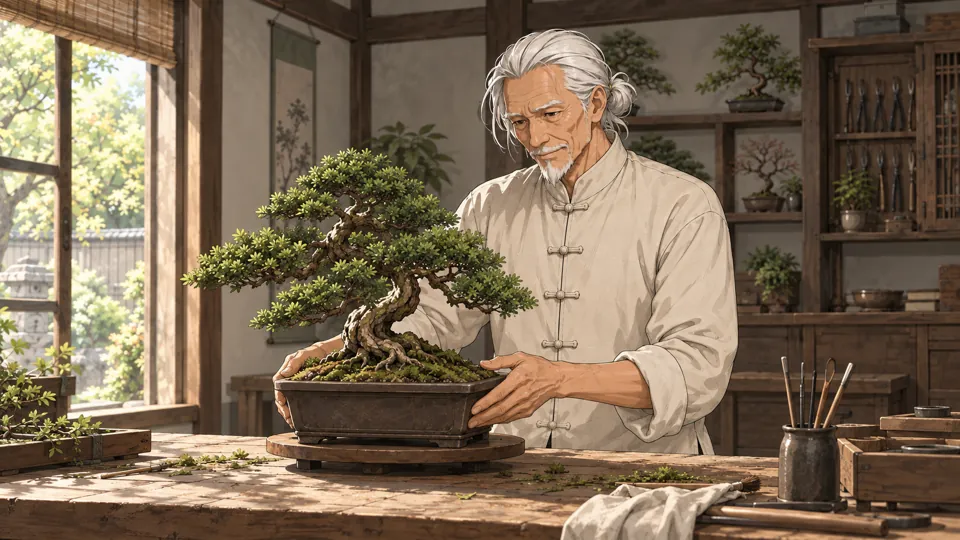
- Face, hair and outfit match the turnaround sheet.
- Hands have five fingers; no text or logos.
- If anything is off, generate again before making the video. The video can only be as good as this frame.
2b · Turn it into video
You · Video
1. Attach 1 image
- Start frame: the image from 2aplus the @song element from step 4
2. Send this message, word for word
The English text below is the exact prompt used. Copy it unchanged to reproduce the workflow.
@song is the same elderly man about seventy: warm tan weathered skin, narrow brown eyes, white swept-back hair tied in a small low bun, white moustache and short pointed beard, visible forehead and eye wrinkles; keep his age, never make him younger. Cream mandarin-collar shirt with knot buttons, black wide trousers. Anime illustration style exactly like the references. Medium shot in a calm sunlit workshop. He slowly turns the bonsai pot a quarter turn with both hands, studies it, and nods slightly. Static camera, single continuous shot. Negative: no extra people, no text or logos, no outfit change, no scene cuts, no camera cuts, correct hands with five fingers.
3. Settings
- Kling 3.0 image-to-video
- Standard mode, 720p
- 3 seconds
- Sound off
- Single shot (multi-shot off)
AI returns
2c · Check the take and trim it
- The first take was usable.
- Watch the whole clip. If the model cut to another camera angle, changed the outfit or added a second person, generate it again; this happens and is normal.
- Use 0–3 s of the 3-second clip.
- Save it as
shot-2.mp4.
Step 7Shot 3: Morning light
3s in the ad · caption: “Grows with you”
3a · Make the first frame
You · First frame
1. Attach 3 images
- Expression (smile)07_expressions_poses/expression_smile.png
- Outfit03_outfits/outfit_work.png
- Scene05_scenes/scene_workspace.png
2. Send this message, word for word
The English text below is the exact prompt used. Copy it unchanged to reproduce the workflow.
Same elderly man about seventy as the reference images: warm tan weathered skin, narrow brown eyes, white swept-back hair tied in a small low bun, white moustache and short pointed beard, visible forehead and eye wrinkles; keep his age, never make him younger. Cream mandarin-collar shirt with knot buttons, black wide trousers. Anime illustration style exactly like the references. Chest-up shot by the workshop window: morning light falls across him and the bonsai, he smiles gently at the little tree. Create one 16:9 cinematic still frame for this shot. He wears the cream mandarin-collar shirt with knot buttons and keeps his age of about seventy. Clean anatomy, no text, no logos.
3. Settings
- GPT image model, image-to-image
- 16:9
- 1K
AI returns
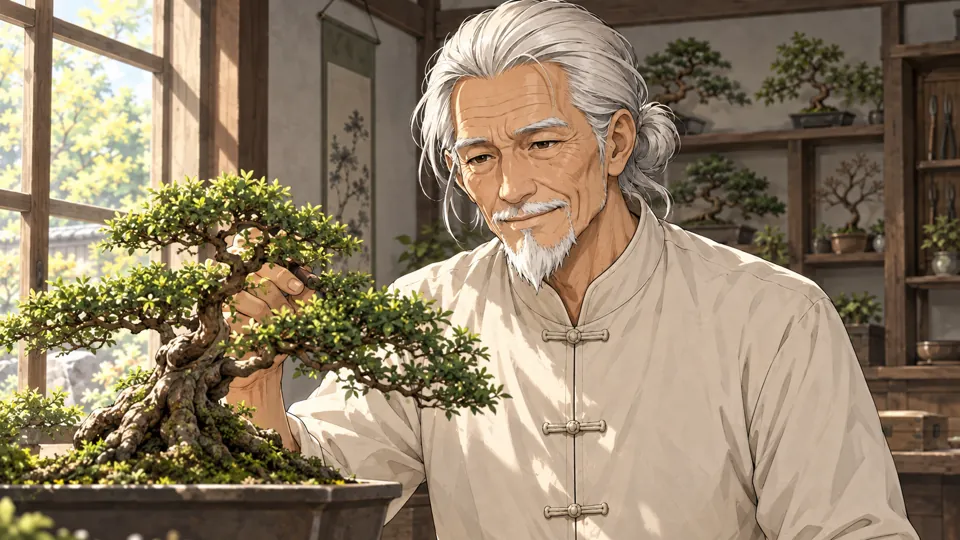
- Face, hair and outfit match the turnaround sheet.
- Hands have five fingers; no text or logos.
- If anything is off, generate again before making the video. The video can only be as good as this frame.
3b · Turn it into video
You · Video
1. Attach 1 image
- Start frame: the image from 3aplus the @song element from step 4
2. Send this message, word for word
The English text below is the exact prompt used. Copy it unchanged to reproduce the workflow.
@song is the same elderly man about seventy: warm tan weathered skin, narrow brown eyes, white swept-back hair tied in a small low bun, white moustache and short pointed beard, visible forehead and eye wrinkles; keep his age, never make him younger. Cream mandarin-collar shirt with knot buttons, black wide trousers. Anime illustration style exactly like the references. Chest-up shot by a workshop window in morning light. Leaves sway outside; he looks at the bonsai and a gentle smile spreads across his face. Static camera, slow push-in, single continuous shot. Negative: no extra people, no text or logos, no outfit change, no scene cuts, no camera cuts, correct hands with five fingers.
3. Settings
- Kling 3.0 image-to-video
- Standard mode, 720p
- 3 seconds
- Sound off
- Single shot (multi-shot off)
AI returns
3c · Check the take and trim it
- The first take was usable.
- Watch the whole clip. If the model cut to another camera angle, changed the outfit or added a second person, generate it again; this happens and is normal.
- Use 0–3 s of the 3-second clip.
- Save it as
shot-3.mp4.
Step 8Cut the ad
Make a 1920×1080 project at 24 fps and lay the parts end to end with hard cuts (no transitions). The finished ad is 12.5 seconds.
| # | File | Use | Length | Caption |
|---|---|---|---|---|
| 1 | shot-1.mp4 | 0–3 s | 3 s | One small cut |
| 2 | shot-2.mp4 | 0–3 s | 3 s | Turn it. Look again. |
| 3 | shot-3.mp4 | 0–3 s | 3 s | Grows with you |
| 4 | product.png | End card | 3.5 s | QUIET PINE / Bonsai Starter Kit / Patience, potted. |
Captions
- Bottom left: 110 px from the left, 170 px from the bottom.
- White, bold italic, 54 px (we used Avenir Next).
- On a rounded black box at about 47% opacity.
- Our “Demo ad · fictional product” label is only there because the products are invented; leave it out of yours.
End card
- product.png for 3.5 s with a slow push-in from 100% to about 110%.
- A cream gradient over the left 60% so the text reads.
- QUIET PINE in bold italic, 110 px; Bonsai Starter Kit at 52 px; the tagline at 40 px in #566e3e.
- The text fades in 0.3 s after the card starts, over 0.4 s.
Music and export
- One track under the whole ad: fade in over 0.5 s, fade out over the last 1.5 s. Use music you have the rights to.
- Export H.264 MP4, 1920×1080.
- The Kling clips are 720p; scaling them to 1080p in the edit is fine for social video.
Prefer the command line? The same edit as an ffmpeg script
Put your clips, product.png, music.mp3 and two font files in one folder and run this. We ran it on our own clips and it reproduces the ad above.
The English text below is the exact prompt used. Copy it unchanged to reproduce the workflow.
#!/bin/sh # Cut the QUIET PINE ad: 3 shots + a 3.5 s product end card, 1920x1080, 24 fps. # Put these files in one folder first: # shot-1.mp4 the video you kept for "One small cut" # shot-2.mp4 the video you kept for "Turn and study" # shot-3.mp4 the video you kept for "Morning light" # product.png the product still # music.mp3 a track you have the rights to use # title.ttf font for captions and the brand (we used Avenir Next Bold Italic) # text.ttf font for the product name and tagline (we used Avenir Next Bold) # Needs an ffmpeg build with the drawtext filter: `ffmpeg -filters | grep drawtext` # must print a line (the static builds linked from ffmpeg.org have it). set -e # 1. Trim each shot, scale it to 1080p and burn in its caption. ffmpeg -y -ss 0 -t 3 -i shot-1.mp4 -an \ -vf "scale=1920:1080:flags=lanczos,fps=24,setsar=1,format=yuv420p,drawtext=fontfile=title.ttf:text='One small cut':fontsize=54:fontcolor=white:x=110:y=h-170:box=1:boxcolor=black@0.47:boxborderw=18" \ -c:v libx264 -crf 17 part-1.mp4 ffmpeg -y -ss 0 -t 3 -i shot-2.mp4 -an \ -vf "scale=1920:1080:flags=lanczos,fps=24,setsar=1,format=yuv420p,drawtext=fontfile=title.ttf:text='Turn it. Look again.':fontsize=54:fontcolor=white:x=110:y=h-170:box=1:boxcolor=black@0.47:boxborderw=18" \ -c:v libx264 -crf 17 part-2.mp4 ffmpeg -y -ss 0 -t 3 -i shot-3.mp4 -an \ -vf "scale=1920:1080:flags=lanczos,fps=24,setsar=1,format=yuv420p,drawtext=fontfile=title.ttf:text='Grows with you':fontsize=54:fontcolor=white:x=110:y=h-170:box=1:boxcolor=black@0.47:boxborderw=18" \ -c:v libx264 -crf 17 part-3.mp4 # 2. End card: the product still with a slow push-in, a soft light fade on the left and the brand. ffmpeg -y -loop 1 -i product.png -f lavfi -i "color=c=0xFAF6F0:s=1920x1080:r=24" -filter_complex \ "[0:v]scale=3840:2160,zoompan=z='1+0.0012*on':x='iw/2-(iw/zoom/2)':y='ih/2-(ih/zoom/2)':d=84:s=1920x1080:fps=24[p];[1:v]format=rgba,geq=r='r(X,Y)':g='g(X,Y)':b='b(X,Y)':a='if(lt(X,1190),215*pow(1-X/1190,1.4),0)'[s];[p][s]overlay=0:0:shortest=1,drawtext=fontfile=title.ttf:text='QUIET PINE':fontsize=110:fontcolor=0x281e20:x=130:y=350:alpha='min(1,max(0,(t-0.3)/0.4))',drawtext=fontfile=text.ttf:text='Bonsai Starter Kit':fontsize=52:fontcolor=0x5f5052:x=136:y=490:alpha='min(1,max(0,(t-0.3)/0.4))',drawtext=fontfile=text.ttf:text='Patience, potted.':fontsize=40:fontcolor=0x566e3e:x=136:y=575:alpha='min(1,max(0,(t-0.3)/0.4))',format=yuv420p" \ -t 3.5 -c:v libx264 -crf 17 end-card.mp4 # 3. Join the parts with hard cuts. printf "file 'part-1.mp4'\nfile 'part-2.mp4'\nfile 'part-3.mp4'\nfile 'end-card.mp4'\n" > parts.txt ffmpeg -y -f concat -safe 0 -i parts.txt -c copy ad-silent.mp4 # 4. Lay the music under it: fade in 0.5 s, fade out over the last 1.5 s. ffmpeg -y -i ad-silent.mp4 -i music.mp3 -filter_complex \ "[1:a]atrim=0:12.5,asetpts=PTS-STARTPTS,afade=t=in:st=0:d=0.5,afade=t=out:st=11:d=1.5,volume=0.9[a]" \ -map 0:v -map "[a]" -c:v copy -c:a aac -b:a 192k -t 12.5 -movflags +faststart song-bo-ad.mp4
Make your own ad with Song Bo
Follow the steps above with your own product: swap the product still and the shot ideas, keep the character description and the character reference.
More examples
All examplesPITWAVE · Team Radio Earpiece
With Liu Xialan · 4 shots · 16s
SOFT HOURS · Silk Lounge Set
With Wu Sefei · 3 shots · 13s
LITTLE HEARTH · Strawberry Cream Puffs
With Wen Li · 3 shots · 13s