How to keep a character consistent in P-Video-2-Pro-Reference
P-Video-2-Pro-Reference is Pruna's reference-to-video model, built on MiniMax H3. One request takes up to 9 reference images and returns a 5 to 15 second clip at up to 768p, from $0.015 per second. Nine images is enough for a character's separate front, side and back views plus outfit, product, scene and the shot's expression, so the model sees the character from every side in every shot.
We have not made an example with P-Video-2-Pro-Reference yet. This page maps the pack to Pruna's published API limits; the nine examples on this site were made with Kling 3.0.
What P-Video-2-Pro-Reference allows
Checked 2026-10-16- Up to 9 images, each up to 20 MiB and 4096 px. A start or end frame counts as one of the 9.
- Optionally up to 3 reference videos (2 to 15 s each, 15 s combined) and up to 3 audio files (15 s combined); keep_audio keeps one audio file as the soundtrack.
- 5 to 15 seconds at 480p or 768p, in 16:9, 9:16, 4:3, 3:4, 3:2, 2:3, 1:1 or adaptive to the references.
- Output costs $0.015 to $0.035 per second depending on resolution and mode (cost or speed), plus $0.005 to $0.01 per reference image.
- Pruna's API docs do not say how to point at a specific image in the prompt or whether order matters. Pruna's product page writes "Image 1".
Sources: Pruna API: p-video-2-pro-reference · Pruna: P-Video-2-Pro (based on MiniMax H3) · Pruna AI on X
Step 1: Start from separate front, side and back views
A turnaround sheet puts three small figures in one image. P-Video-2-Pro-Reference takes images one by one, so each view works best as its own full-size file. Every character pack here has the sheet and the three views as separate files, plus the outfit, prop, scene, expression and pose images used below.
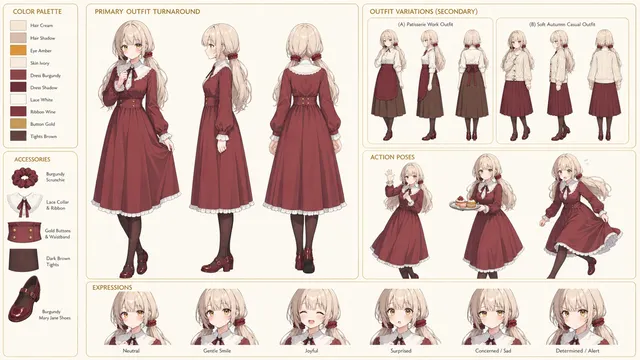
Step 2: Fill the 9 image slots
Send the images in this order and keep it the same from shot to shot. Slots 1 to 4 fix identity, 5 to 7 the outfit, product and place; 8 and 9 change per shot.
- image 1
02_turnaround_views/view_front.pngFace and front of the outfit - image 2
02_turnaround_views/view_side.pngProfile and hair from the side - image 3
02_turnaround_views/view_back.pngHair and outfit from behind - image 4
01_character_reference/full_body.pngHeight and proportions - image 5
03_outfits/outfit_work.pngThe job outfit - image 6
04_props/prop_role.pngThe product or tool - image 7
05_scenes/scene_workspace.pngThe location - image 8
07_expressions_poses/expression_*.pngThe expression closest to the shot - image 9
07_expressions_poses/pose_*.pngThe pose closest to the action
To open the shot on one of the pack's video first frames, pass it as first_frame_image and drop the pose from the image list: the start frame counts toward the 9. Leave out the overview sheet, which repeats the three views at a smaller size.
Step 3: Write the prompt
This follows the "Image 1" wording on Pruna's product page, numbered in the order of the image list. Pruna's API docs do not define a syntax, so check the first result before running a batch.
Image 1, Image 2 and Image 3 are the front, side and back of the same character, [name]: [age], [skin, eyes, hair]. Body proportions as in Image 4. [He / She] wears the outfit from Image 5 and holds the [product] from Image 6, in the room from Image 7, with the expression from Image 8. [Action]. [Camera], single continuous shot. No extra people, no text or logos, no outfit change.
Step 4: Send the request
Upload each pack file to POST https://api.pruna.ai/v1/files first and pass the returned URLs, in slot order, as image. Add the Try-Sync: true header to wait for the result in the same call.
curl -X POST 'https://api.pruna.ai/v1/predictions' \ -H 'Content-Type: application/json' \ -H "apikey: $PRUNA_API_KEY" \ -H 'Model: p-video-2-pro-reference' \ -d '{ "input": { "prompt": "Image 1, Image 2 and Image 3 are the front, side and back of ...", "image": [ "https://api.pruna.ai/v1/files/<view_front>", "https://api.pruna.ai/v1/files/<view_side>", "https://api.pruna.ai/v1/files/<view_back>", "https://api.pruna.ai/v1/files/<full_body>" ], "duration": 5, "resolution": "768p", "aspect_ratio": "16:9" } }'
What a clip costs
Worked out from Pruna's price list: output seconds plus a fee per reference image. Reference videos and audio cost extra.
| Clip | 480p, cost mode | 768p, speed mode |
|---|---|---|
| 5 s, 4 images | $0.095 | $0.215 |
| 5 s, 9 images | $0.12 | $0.265 |
| 10 s, 9 images | $0.195 | $0.44 |
P-Video-2-Pro-Reference vs Kling 4.0 vs Vidu Q4
All three take several reference images in one generation. Figures come from each model's own pages, checked on the date shown in each guide. P-Video-2-Pro-Reference trades resolution for price: it stops at 768p.
Questions
- Can it use a three-view turnaround?
- Yes, as three separate images. The pack's front, side and back views are separate files, so each fills its own slot at full size. That leaves 6 slots for the full body, outfit, product, scene and the shot's expression and pose.
- How much does a 5-second clip cost?
- At Pruna's listed prices, a 5-second clip with 9 reference images is about $0.12 at 480p in cost mode and about $0.27 at 768p in speed mode.
- Do I need all 9 images?
- No, one is the minimum. Slots 1 to 4 do most of the identity work; add the rest only when the shot shows them. Each image costs up to a cent, so the full set adds about $0.09.
- Does image order matter?
- Pruna's API docs do not say. Keep the same order in every shot anyway, so "Image 1" always means the front view and a change in the result cannot come from a reshuffle.
Start with a free character
Every character's full 19-image pack is free: eight starter characters need no account, the rest a free sign-up. All nine example ads use pack images only.
Browse free characters